
Mazda 3 Service Manual: Turbocharger Inspection [Mzr 2.3 Disi Turbo]
Compressor Wheel Inspection
1. Remove the turbocharger..
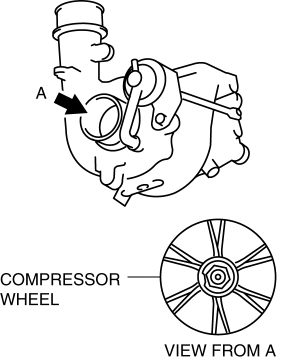
2. Visually inspect the compressor wheel from view A for the cracks, damage, or bending on all the compressor wheel blades.
-
If there are any cracks or damage, replace the turbocharger..
NOTE:
-
If there is contact between the compressor wheel and compressor housing, there may be cracks, damage, or bending on the blade end area.
-
If there are cracks, damage, or bending on the compressor wheel, verify the following after replacing the turbocharger.
-
Intake air/exhaust system related components
-
Oil outlet pipe and oil inlet pipe damage
-
Turbine Wheel Inspection
1. Remove the turbocharger..
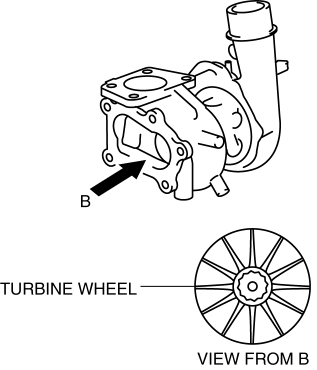
2. Visually inspect the turbine wheel from view B for the cracks, damage, or bending on all the turbine wheel blades.
-
If there are cracks, damage, or bending on the turbine wheel, replace the turbocharger..
NOTE:
-
If there is contact between the turbine wheel and turbine housing, there may be cracks, damage, or bending on the blade end area.
-
If there are cracks, damage, or bending on the turbine wheel, verify the following after replacing the turbocharger.
-
Intake air/exhaust system related components
-
Oil outlet pipe and oil inlet pipe damage
-
 Input/Turbine Speed Sensor Removal/Installation [FS5 A EL]
CAUTION:
Always use a new bolt. If the removed input/turbine speed sensor installation
bolt is reused, it may cause oil leakage.
A sealant coating is applied to the input/turbine s ...
 Wastegate Actuator Inspection [Mzr 2.3 Disi Turbo]
1. Remove the air hose and air duct..
2. Disconnect the hose from the wastegate actuator.
3. Plug the wastegate actuator as shown in the figure.
4. Connect the vacuum pump to the port
5. R ...
Other materials:
Component Parts
Audio unit
Microphone (hands-free)
The microphone is used for speaking voice commands or when making a
Hands-free call.
Talk button, Pick-Up button and Hang-Up button (hands-free)
The basic functions of Bluetooth ® Hands-Free can be used for such things as
making calls or
hanging up ...
DSC HU/CM Inspection
1. Disconnect the DSC HU/CM connector..
2. Connect the negative battery cable..
3. Attach the tester lead to the DSC HU/CM wiring harness-side connector and
inspect voltage, continuity, or resistance according to the standard (reference)
on the table.
Standard (Reference)
...
Front Lower Arm Inspection
1. Remove the front lower arm from the vehicle..
2. Inspect the arm for bending or damage, and the ball joint for excessive looseness.
If there is any malfunction, replace the front lower arm.
3. Rotate the ball joint stud 5 times. Install the SST to the ball
joint stud, measure t ...
