
Mazda 3 Service Manual: Ventilator Grille Removal/Installation
Side Ventilator grille
1. Through the wiring harness into the position shown in the figure, remove the side ventilator grille in the direction of arrow.
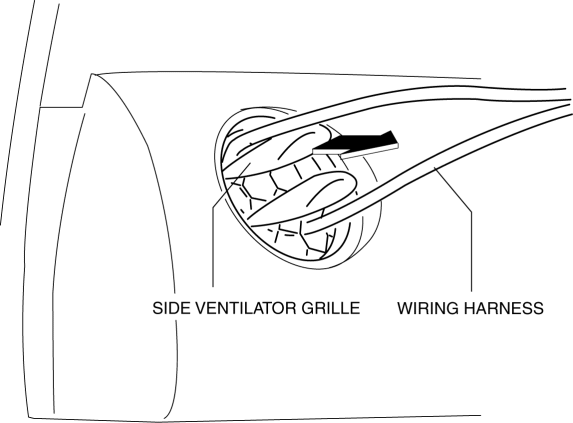
2. When installing the side ventilator grille, push it for the dashboard.
Center Ventilator grille
1. Disconnect the negative battery cable..
2. Remove the center panel..
3. Push the edge of center panel in the direction of arrow (1) and detach the hooks.
4. Remove the center ventilator grille in the direction of arrow (2) shown in the figure.
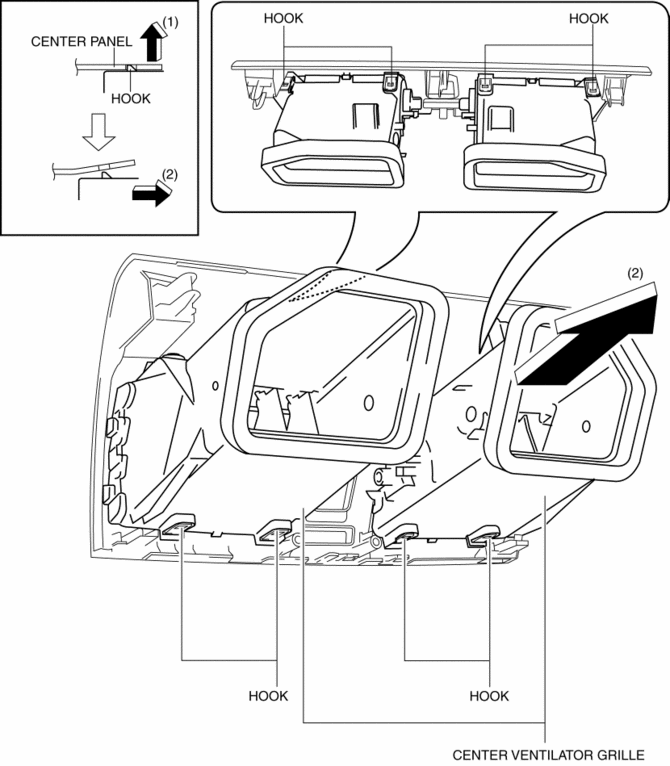
5. Install in the reverse order of removal.
 Splash Shield Removal/Installation
Front Splash Shield
1. Remove the bolts and fastener then remove the front splash shield.
2. Install in the reverse order of removal.
Rear Splash Shield
1. Remove the fastener, screws and ca ...
 Front Crossmember Removal/Installation
CAUTION:
Performing the following procedures without first removing the ABS wheel-speed
sensor may possibly cause an open circuit in the wiring harness if it is pulled
by mistake. Before ...
Other materials:
Variable Tumble Shutter Valve Switch Inspection [Mzr 2.0, Mzr 2.5]
Voltage Inspection
NOTE:
The variable tumble shutter valve switch cannot be removed as a single unit.
When replacing the variable tumble shutter valve switch, replace it together
with the intake manifold as a single unit.
1. Connect the M-MDS to the DLC–2.
2. Switch the ...
Seat Weight Sensor Control Module Removal/Installation [Two Step Deployment
Control System]
CAUTION:
When the seat weight sensor control module is replaced with a new one, perform
the seat weight sensor calibration using the M–MDS..
1. Switch the ignition to off.
2. Disconnect the negative battery cable and wait for 1 min or more..
3. Disconnect the connectors.
...
Restraints SST [Standard Deployment Control System]
49 H066 002
Deployment tool
49 D066 002
Adapter harness
49 L066 002
Adapter harness
49 B066 004
Adapter harness
49 N088 0A0
Fuel and Therm ...
