
Mazda 3 Service Manual: Airflow Mode Actuator Inspection [Full Auto Air Conditioner]
CAUTION:
-
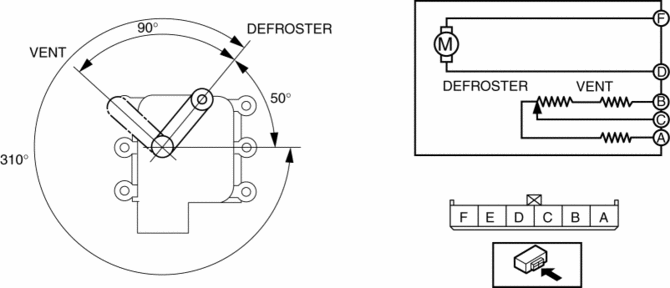
If the lever position exceeds the operation range shown in the figure, the circuit in the actuator could be damaged. Always perform an actuator operation inspection with the lever movement within the range shown in the figure.
1. Connect battery positive voltage to airflow mode actuator terminal D (or F), connect terminal F (or D) to ground, and then verify that the airflow mode actuator operates as shown in the table.
-
If the operation condition is not normal, replace the airflow mode actuator.
|
Terminal |
Airflow mode actuator operation |
|
|
D |
F |
|
|
B+ |
Ground |
DEFROSTER → VENT |
|
Ground |
B+ |
VENT → DEFROSTER |
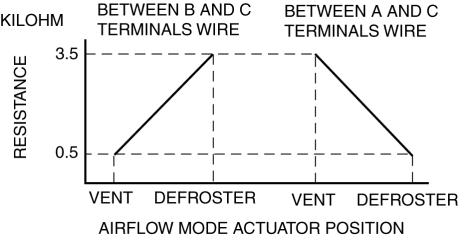
2. Verify that the resistance between terminals B and C, C and A matches the airflow mode actuator operation as shown in the graph.
-
If the operation condition and resistance are not normal, replace the airflow mode actuator.
 Air Mix Actuator Removal/Installation [Full Auto Air Conditioner]
Driver-side
1. Disconnect the negative battery cable..
2. Disconnect the connector.
3. Remove the hook (1), remove the rod (2) from the air mix actuator link.
4. Remove the screw.
5. ...
 Airflow Mode Actuator Removal/Installation [Full Auto Air Conditioner]
1. Set the air intake mode to FRESH.
2. Set the air mix mode to MAX COLD.
3. Disconnect the negative battery cable..
4. Remove the following parts:
a. Front doors.
b. Front scuff plate.
c. ...
Other materials:
Rear Upper Arm Removal/Installation
1. When working on the right side of the vehicle, disconnect the canister vent
(CV) solenoid valve from the rear crossmember. (MZR 2.0 (Except Mexico), SKYACTIV-G
2.0, MZR 2.3 DISI Turbo, MZR 2.5 (Except Mexico))
2. Remove in the order indicated in the table.
3. Install in the reverse or ...
Emission Control System
This vehicle is equipped with an emission control system (the catalytic
converter is
part of this system) that enables the vehicle to comply with existing exhaust
emissions
requirements.
WARNING
Never park over or near anything fl ammable:
Parking over or near anything fl ammable ...
Body And Accessories
ABBREVIATIONS
ACC
Accessories
AUX
Auxiliary jack
CAN
Controller Area Network
DLC
Data Link Connector
GND
Ground
LH
Left Hand
...
