
Mazda 3 Service Manual: Antenna Feeder No.6 Inspection
1. Disconnect the negative battery cable..
2. Remove the following parts:
a. Upper panel.
b. Shift knob (MTX).
c. Selector lever knob (ATX).
d. Shift panel.
e. Side wall.
f. Console.
g. Car-navigation unit.
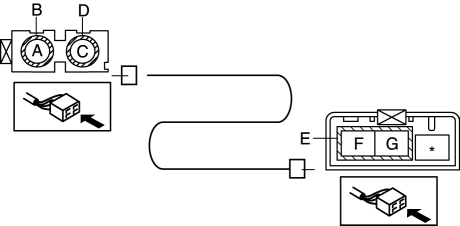
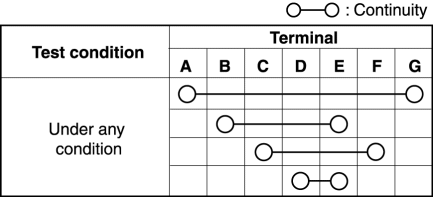
3. Verify that the continuity between antenna feeder No.6 terminals is as indicated in the table.
-
If not as indicated in the table, replace antenna feeder No.6.
 Antenna Feeder No.5 Removal/Installation
1. Disconnect the negative battery cable..
2. Remove the following parts:
a. Front scuff plate (RH).
b. Front side trim (RH).
c. Rear scuff plate (RH).
d. B-pillar lower trim (RH).
e. Rear ...
 Antenna Feeder No.6 Removal/Installation
NOTE:
Antenna feeder No.6 is integrated with the vehicle wiring harness.
1. Refer to CAR-NAVIGATION UNIT REMOVAL/INSTALLATION. ...
Other materials:
Advanced Park guidance screens
The Subaru Solterra Advanced Park system provides clear and intuitive guidance
screens on the multimedia display, helping the driver easily understand vehicle
positioning and parking operations in real time.
Guidance screen (When assistance starts)
Target parking space box (blue)
Ad ...
Relay Block Inspection [With Advanced Keyless Entry And Push Button Start System]
1. Disconnect the negative battery cable..
2. Remove the following parts:
a. Driver-side front scuff plate.
b. Driver-side front side trim.
c. Hood release lever.
d. Upper panel.
e. Shift knob (MTX)(See MANUAL TRANSAXLE SHIFT MECHANISM REMOVAL/INSTALLATION
[G66M-R].)(See MANUAL TRANSAX ...
Headlight aim
Vertical movement adjusting bolts
Adjustment bolt A
Adjustment bolt B
Before checking the headlight aim
Park your Subaru Solterra on a flat, level surface.
Ensure all tires are inflated to the recommended pressure.
Have a person seated in the driver’s seat to simulate normal ...
