
Mazda 3 Service Manual: Front Beltline Molding Removal/Installation
1. Fully open the front door glass.
2. Disconnect the negative battery cable..
3. Remove the inner garnish..
4. Remove the front door trim..
5. Remove the power outer mirror..
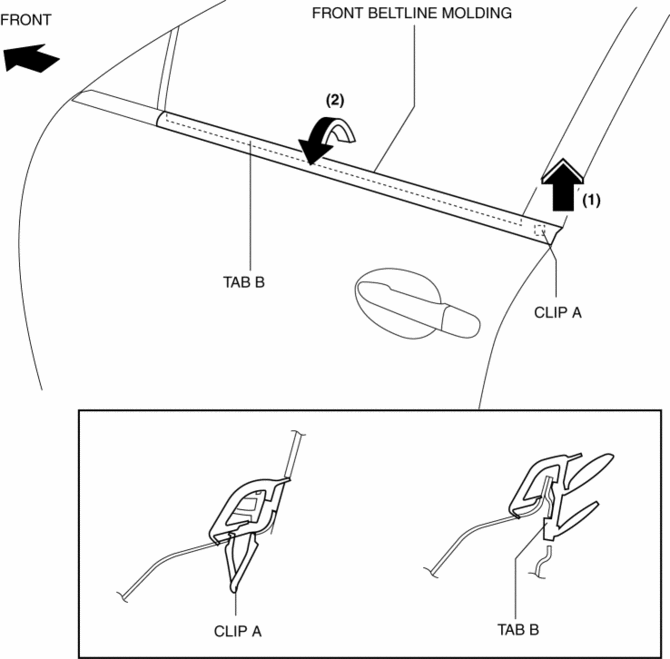
6. Remove clip A using a fastener remover and pull the front beltline molding in the direction of the arrow (1) shown in the figure.
7. Rotate the front beltline molding in the direction of the arrow (2) shown in the figure and remove it while detaching tab B.
8. Install in the reverse order of removal.
 Floor Under Cover Removal/Installation
1. Lift up the vehicle.
2. Remove the cap nuts.
3. Remove the nus.
4. Pull the floor under covers in the direction of arrow (1), (2), (3) shown
in the figure, and then remove it.
5. ...
 Front Bumper Disassembly/Assembly
Standard Type
Except SKYACTIV-G 2.0
1. Disassemble in the order indicated in the table.
1
Screw A
2
Guard cover
3
...
Other materials:
Wheel Hub Component Removal/Installation
CAUTION:
Performing the following procedures without first removing the ABS wheel-speed
sensor may possibly cause an open circuit in the wiring harness if it is pulled
by mistake. Before performing the following procedures, disconnect the ABS wheel-speed
sensor connector (axle side) ...
Rear Crossmember Removal/Installation
CAUTION:
Performing the following procedures without first removing the ABS wheel-speed
sensor may possibly cause an open circuit in the wiring harness if it is pulled
by mistake. Before performing the following procedures, disconnect the ABS wheel-speed
sensor wiring harness connec ...
Heating
Set the mode selector dial to the
position.
Set the air intake selector to the outside
air position.
Set the temperature control dial to the
hot position.
Set the fan control dial to the desired
speed.
If dehumidified heating is desired, turn
on the air conditioner.
NOTE
...
