
Mazda 3 Service Manual: Audio Unit Disassembly/Assembly
CAUTION:
-
When disassembling the audio unit, it could get scratched if it is placed directly on the ground. When disassembling the audio unit, spread a soft cloth underneath to perform the work.
1. Disassemble in the order indicated in the table.
2. Assemble in the reverse order of disassembly.
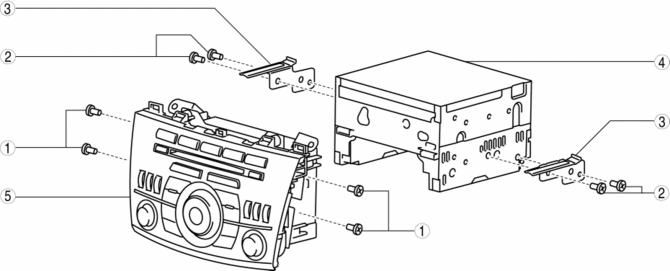
|
1 |
Screw A |
|
2 |
Screw B |
|
3 |
Bracket |
|
4 |
Audio unit |
|
5 |
Audio panel |
 Audio Unit
NOTE:
“iPod” is a registered trademark of Apple Inc. in the United States and other
countries.
Purpose
The audio unit controls the CD, radio, exterior input devices (AUX/US ...
 Audio Unit Removal/Installation
Without Display
CAUTION:
When installing the audio unit, make sure that the wiring harness and antenna
feeder are not caught between the unit and dashboard. If the wiring harness
or the ...
Other materials:
Rain Sensor Removal/Installation
1. Disconnect the negative battery cable..
2. Spread open the rain sensor cover in the direction of the arrows and disengage
tabs A to remove it.
3. Disconnect the rain sensor connector.
4. Slide rain sensor tab B in the direction of the arrow shown in the figure
and detach tab B. ...
Fuel-Filler Lid and Cap
WARNING
When removing the fuel-fi ller cap,
loosen the cap slightly and wait for any
hissing to stop, then remove it:
Fuel spray is dangerous. Fuel can
burn skin and eyes and cause illness
if ingested. Fuel spray is released
when there is pressure in the fuel tank
and ...
TCM Removal/Installation [FS5 A EL]
CAUTION:
Do not apply a shock to or touch the projection on the TCM, otherwise it
may not operate normally.
1. Perform the following procedures.
a. Remove the battery cover..
b. Disconnect the negative battery cable.
c. Remove the battery component (ex: battery, battery tray a ...
