
Mazda 3 Owners Manual: Automatic Climate Control
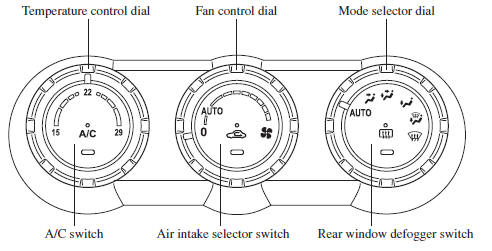
- Control Switches
- Operation of Automatic Air Conditioning
- Windshield Defrosting and Defogging
- Sunlight/Temperature Sensor
 Dehumidifying (With air
conditioner)
Dehumidifying (With air
conditioner)
Operate the air conditioner in cool or cold
weather to help defog the windshield and
side windows.
Set the mode selector dial to the desired
position.
Set the air intake selector to the outs ...
 Control Switches
Temperature control dial
This dial controls temperature. Turn it
clockwise for hot and counterclockwise
for cold.
Fan control dial
The fan has seven speeds.
AUTO position
The amount of airflow ...
Other materials:
Receiving an Incoming Call
When an incoming call is received, the incoming call notification screen is
displayed. The
“Incoming Call Notifications” setting must be on.
Refer to Communication Settings on .
To accept the call, press the pick-up button on the audio control switch or
select on
the screen.
To r ...
Wheel Balance Adjustment
CAUTION:
Adjust the outer wheel balance first, then the inner wheel balance.
Be careful not to scratch the wheels.
Adhesive-type Balance Weight (Outer)
1. Remove the old balance weight from the wheel.
2. Remove the double-sided adhesive tape remaining on the wheel, then clea ...
How to Use Pandora
What is Pandora ® ?
Pandora ® is free personalized Internet radio. Simply enter a favorite
artist, track, genre,
and Pandora ® will create a personalized station that plays their music and more
like it.
Rate songs by giving thumbs-up and thumbs-down feedback to further refine your
stat ...
