
Mazda 3 Service Manual: Buckle Switch Inspection
Driver Side
1. Switch the ignition to off.
2. Disconnect the negative battery cable..
3. Remove the front seat..
4. Remove the front buckle..
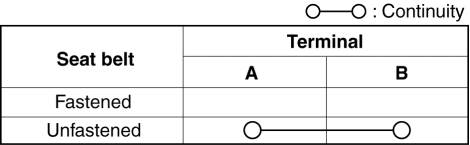
5. Inspect for continuity between the buckle switch terminals using a tester.
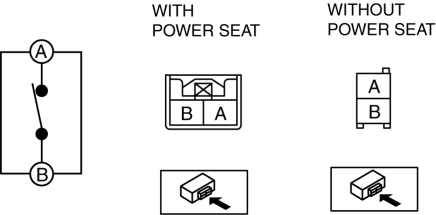
-
If not as indicated in the table, replace the driver side front buckle.
Passenger Side
1. Connect the M-MDS (IDS) to the DLC-2.
2. After the vehicle is identified, select the following items from the initialization screen of the IDS.
a. Select “DataLogger”.
b. Select “Modules”.
c. Select “RCM”.
3. Verify that it is displayed according to the table using “BUCKLE_P”.
|
M-MDS display |
Operation Status |
|
Unbuckled |
Passenger-side front seat belt not fastened |
|
Buckled |
Passenger-side front seat belt fastened |
-
If not as indicated in the table, replace the passenger side front buckle.
 Air Bag Module And Pre Tensioner Seat Belt Disposal Procedures
WARNING:
A live (undeployed) air bag module or pre-tensioner seat belt may accidentally
operate (deploy) when it is disposed of and cause serious injury. Always refer
to the “AIR BAG ...
 Child Restraint Seat Anchor Removal/Installation
4SD
1. Remove the cover.
2. Remove the bolt and child-restraint seat anchor.
3. Install in the reverse order of removal.
5HB
1. Remove the trunk end trim..
2. Remove the bolt and ...
Other materials:
If a warning message is displayed
The multi-information display of the Subaru Solterra provides important
alerts related to system malfunctions, incorrect operations, and maintenance requirements.
These messages are designed to help the driver quickly identify and respond to potential
issues.
Whenever a warning message appe ...
Seat Warmer Unit Inspection
WARNING:
Handling a front seat (with built-in side air bag) improperly can accidentally
operate (deploy) the air bag, which may seriously injure you. Read the service
warnings before handling a front seat (with built-in side air bag)..
CAUTION:
After removing a front seat ...
Mass Air Flow (MAF) Sensor/Intake Air Temperature (Iat) Sensor No.1 Removal/Installation
[Skyactiv G 2.0]
CAUTION:
Be careful not to hit the sensor element or allow foreign matter to get on
it during sensor removal/installation. If the sensor element is hit or foreign
matter gets on it, an error may occur in the sensor output signal resulting
in deterioration in the engine control.
...
