
Mazda 3 Service Manual: Column Cover Removal/Installation
1. Pull down the steering wheel.
2. Pull the upper column cover in the direction of the arrow in the order of (1) and (2), then remove the upper column cover while detaching the hooks and pins.
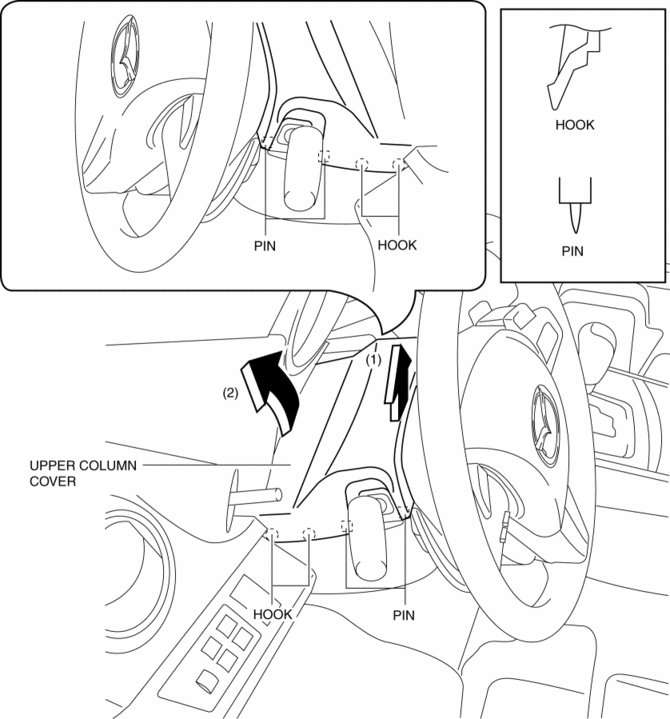
3. Pull up the steering wheel.
4. Remove the ignition key illumination..
5. Remove the screws.
6. Remove the lower column cover in the direction of the arrow (4) while keeping it open in the direction of the arrow (3) shown in the figure.
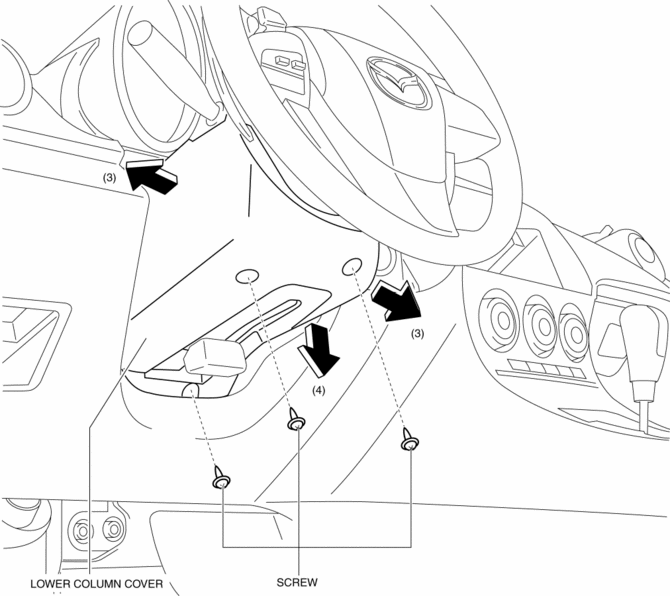
7. Install in the reverse order of removal.
 Center Panel Removal/Installation
1. Disconnect the negative battery cable..
2. Affix protective tape to the position shown in the figure.
3. Hold parts (A) shown in the figure with your hands and pull the lower edge
of the ...
 Dashboard Disassembly/Assembly
1. Remove the ventilator grilles..
2. Remove the Passenger-side air bag module..
3. Disassemble in the order indicated in the table.
4. Assemble in the reverse order of disassembly.
...
Other materials:
Key Interlock System Inspection
Key Interlock System Inspection
1. Switch the ignition to ON.
2. Perform the following procedures to inspect the key interlock system.
If there is any malfunction, inspect the key interlock solenoid and NOT P
position switch..
a. Verify that the ignition cannot be switched to off ...
Radio Reception
AM characteristics
AM signals bend around such things as
buildings or mountains and bounce off the
ionosphere.
Therefore, they can reach longer distances
than FM signals.
Because of this, two stations may
sometimes be picked up on the same
frequency at the same time.
FM characterist ...
Digital key
In the Subaru Solterra, a compatible smartphone can function as a
fully integrated replacement for the traditional electronic key when the dedicated
Digital Key App is installed. This advanced feature also allows secure sharing of
access with family members or trusted individuals through the s ...
