
Mazda 3 Service Manual: Cruise Control Switch Inspection [Mzr 2.3 Disi Turbo]
1. Remove the battery cover..
2. Disconnect the negative battery cable and wait for 1 min or more
..
3. Remove the driver–side air bag module..
4. Disconnect the clock spring connector (part wiring harness-side).
5. Measure the resistance between clock spring terminals K and M (part wiring harness-side) using a tester.
-
If not as specified, replace the steering switch..
|
Switch condition |
Resistance (ohm) |
|
Cruise OFF switch held at on |
Continuity |
|
CANCEL switch held at on |
Approx. 120 |
|
SET (-) switch held at on |
Approx. 300 |
|
SET (+) switch held at on |
Approx. 600 |
|
RESUME switch held at on |
Approx. 1,110 |
|
Cruise ON switch held at on |
Approx. 2,110 |
|
Neutral |
Approx. 4,310 |
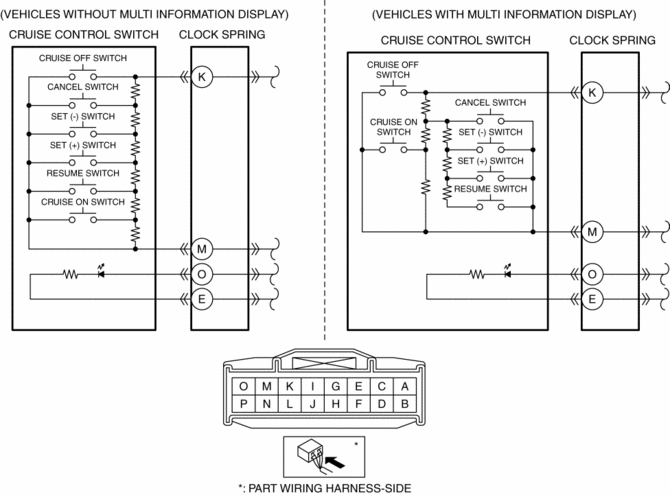
6. Apply battery positive voltage to clock spring connector terminal O (part wiring harness-side), and terminal E (part wiring harness-side) to ground.
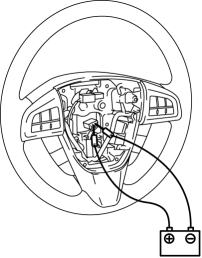
7. Verify that the LED illuminates.
-
If the LED does not illuminate, replace the steering switch..
 Cruise Control Switch Inspection [Mzr 2.0, Mzr 2.5]
1. Remove the battery cover..
2. Disconnect the negative battery cable and wait for 1 min or more..
3. Remove the driver–side air bag module..
4. Disconnect the clock spring connector (part w ...
 Electronics
...
Other materials:
Restraints SST [Two Step Deployment Control System]
49 H066 002
Deployment tool
49 D066 002
Adapter harness
49 L066 002
Adapter harness
49 G066 003
Adapter harness
49 N088 0A0
Fuel and Thermometer checker
...
Starter Cut Relay Inspection [MTX]
Advanced Keyless Entry And Push Button Start System Only
1. Disconnect the negative battery cable.
2. Remove the following parts:
a. Front scuff plate (LH).
b. Front side trim (LH).
c. Side wall.
d. Console.
3. Set the bonnet release lever out of the way..
4. Remove the lower panel.. ...
Front Tilt Motor Inspection
1. Remove the battery cover..
2. Disconnect the negative battery cable and wait 1 min or more..
3. Disconnect the front tilt motor connector.
4. Apply battery positive voltage to the front tilt motor terminals and inspect
the front tilt motor operation
If not as specified, replac ...
