
Mazda 3 Service Manual: Cruise Control Switch Inspection [Mzr 2.0, Mzr 2.5]
1. Remove the battery cover..
2. Disconnect the negative battery cable and wait for 1 min or more
..
3. Remove the driver–side air bag module..
4. Disconnect the clock spring connector (part wiring harness-side).
5. Measure the resistance between clock spring terminals K and M (part wiring harness-side) using a tester.
-
If not as specified, replace the steering switch..
|
Switch condition |
Resistance (ohm) |
|
Cruise OFF switch held at on |
Continuity |
|
CANCEL switch held at on |
Approx. 120 |
|
SET (-) switch held at on |
Approx. 300 |
|
SET (+) switch held at on |
Approx. 600 |
|
RESUME switch held at on |
Approx. 1,110 |
|
Cruise ON switch held at on |
Approx. 2,110 |
|
Neutral |
Approx. 4,310 |
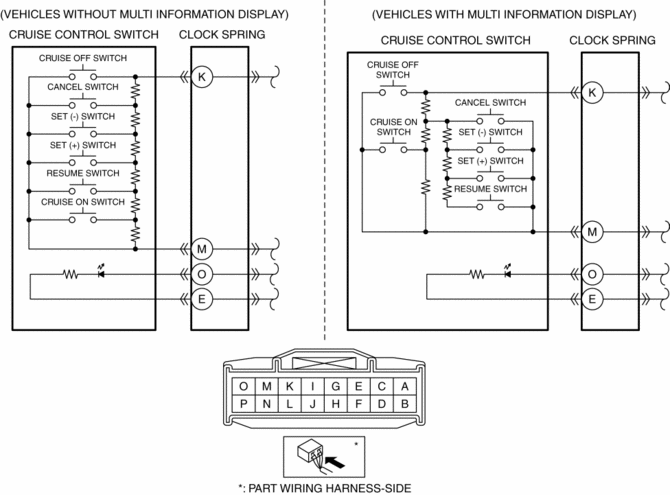
6. Apply battery positive voltage to clock spring connector terminal O (part wiring harness-side), and terminal E (part wiring harness-side) to ground.
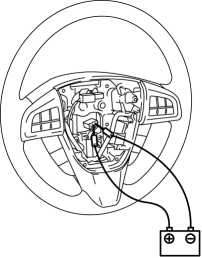
7. Verify that the LED illuminates.
-
If the LED does not illuminate, replace the steering switch..
 Cruise Control
...
 Cruise Control Switch Inspection [Mzr 2.3 Disi Turbo]
1. Remove the battery cover..
2. Disconnect the negative battery cable and wait for 1 min or more..
3. Remove the driver–side air bag module..
4. Disconnect the clock spring connector (part w ...
Other materials:
Utility vehicle precautions
The Subaru Solterra belongs to the utility vehicle category, engineered
with increased ground clearance and a comparatively narrower track width relative
to its center of gravity height. This design allows the Subaru Solterra to perform
effectively across a wide range of off-road environments ...
Customer Assistance (Mexico)
Your complete and permanent satisfaction is our business. We are here to
serve you. All
Authorized Mazda Dealers have the knowledge and the tools to keep your Mazda
vehicle in
top condition.
If you have any questions or recommendations for improvement regarding the
service of
your Mazda ...
Rear Center Speaker Inspection
1. Disconnect the negative battery cable..
2. Remove the following parts:
a. Rear seat cushion.
b. Rear scuff plate.
c. Tire house trim.
d. C-pillar trim.
e. Rear package trim.
f. Rear center speaker.
3. Verify the resistance between the rear center speaker terminals.
If ...
