
Mazda 3 Owners Manual: Driving on Uneven Road
Your vehicle's suspension and underbody can be damaged if driven on rough/uneven roads or over speed bumps at excessive speeds. Use care and reduce speed when traveling on rough/uneven roads or over speed bumps.
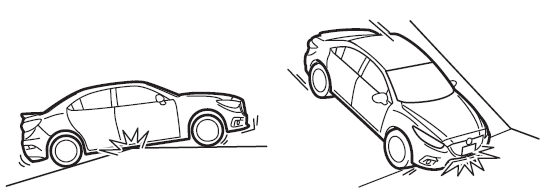
Use care not to damage the vehicle's underbody, bumpers or muffler(s) when driving under the following conditions:
- Ascending or descending a slope with a sharp transition angle
- Ascending or descending a driveway or trailer ramp with a sharp transition angle
This vehicle is equipped with low profile tires allowing class-leading performance and handling. As a result, the sidewall of the tires are very thin and the tires and wheels can be damaged if driven through potholes or on rough/uneven roads at excessive speeds. Use care and reduce speed when traveling on rough/uneven roads or through potholes.
 Overloading
WARNING
Be careful not to overload your vehicle:
The gross axle weight rating (GAWR)
and the gross vehicle weight rating
(GVWR) of the vehicle are on the
Motor Vehicle Safety Sta ...
 Towing
Trailer Towing
Your Mazda is not designed for towing.
Never tow a trailer with your Mazda.
Recreational Towing
An example of "recreational towing" is
towing your vehicle behind a mot ...
Other materials:
Windshield Wipers and Washer
The ignition must be switched ON to use
the wipers.
WARNING
Use only windshield washer fl uid or
plain water in the reservoir:
Using radiator antifreeze as washer
fl uid is dangerous. If sprayed on the
windshield, it will dirty the windshield,
aff ect your visibility, and ...
Basic Inspection [FS5 A EL]
STEP
INSPECTION
ACTION
1
Measure the battery voltage.
Is the battery voltage 10.0—14.0 V?
Yes
Go to the next step.
No
Replace or recharge the battery.
(See BATTERY RECHA ...
Headlight Leveling Actuator Inspection
NOTE:
Headlight leveling actuator are integrated with the front combination light.
For the actuator inspection of the headlight auto leveling system, perform
the headlight leveling actuator operation inspection..
1. Measure the voltage at each terminal is as indicated in the ...
