
Mazda 3 Service Manual: Refrigerant Pressure Sensor Removal/Installation [Manual Air Conditioner]
1. Disconnect the negative battery cable..
2. Discharge the refrigerant..
3. Disconnect the refrigerant pressure sensor connector.
CAUTION:
-
If moisture or foreign material enters the refrigeration cycle, cooling ability will be lowered and abnormal noise will occur. Always immediately plug all open fittings after removing any refrigeration cycle parts to keep moisture or foreign material out of the cycle.
4. Loosen the refrigerant pressure sensor using two spanners.
5. Remove the refrigerant pressure sensor..
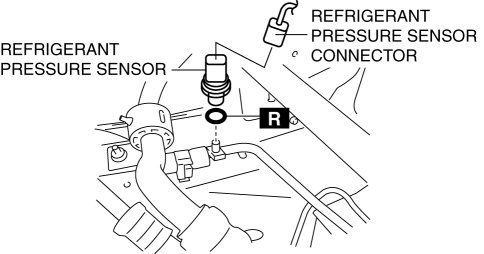
-
Tightening torque
-
10—11 N·m {102—112 kgf·cm, 89—97 in·lbf}
6. Install in the reverse order of removal.
7. Perform the refrigerant system performance test..
Refrigerant Pressure Sensor Installation Note
1. Apply compressor oil to the O-rings and connect the joints.
 Refrigerant Pressure Sensor Removal/Installation [Full Auto Air Conditioner]
1. Disconnect the negative battery cable..
2. Discharge the refrigerant..
3. Disconnect the refrigerant pressure sensor connector.
CAUTION:
If moisture or foreign material enters the ref ...
 Engine Assembly
...
Other materials:
Afs (Adaptive Front Lighting System) Off Switch Removal/Installation
1. Disconnect the negative battery cable..
2. Remove the switch panel in the direction of the arrow shown in the figure.
3. Disconnect the connector.
4. Remove the AFS OFF switch in the direction of the arrow (2) shown in the figure
while pressing the tabs in the direction of the arrow ...
If you have a flat tire
The Subaru Solterra is designed without a conventional spare wheel
and instead comes equipped with an advanced emergency tire puncture repair kit,
providing a modern and space-efficient solution for unexpected tire damage.
In the Subaru Solterra, minor punctures caused by objects such as nail ...
Customization
Customizable features
The Subaru Solterra is equipped with a wide range of configurable
electronic systems that allow you to tailor vehicle behavior and comfort settings
according to your personal preferences. These adjustments can be performed via the
multi-information display, the multimedi ...
