
Mazda 3 Service Manual: Fan Switch Inspection [Manual Air Conditioner]
1. Disconnect the negative battery cable..
2. Remove the following parts:
a. Upper panel.
b. Shift lever knob (MTX).
c. Selector lever knob (ATX).
d. Shift panel.
e. Side wall.
f. Console.
g. Front scuff plate.
h. Front side trim.
i. Dashboard under cover.
j. Glove compartment.
k. Hood release lever.
l. Lower panel.
m. Center panel.
n. Audio unit.
o. Climate control unit.
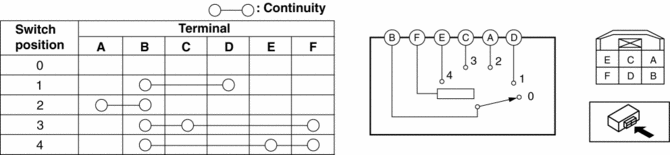
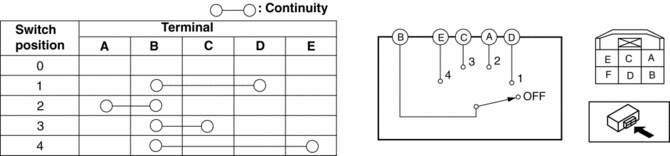
3. Verify that the continuity between the fan switch terminals as indicated in the table.
-
If there is any malfunction, replace the fan switch.
SKYACTIV-G 2.0
MZR 2.0, MZR 2.5
 Expansion Valve Removal/Installation
1. Disconnect the negative battery cable..
2. Discharge the refrigerant from the system..
CAUTION:
If moisture or foreign material enters the refrigeration cycle, cooling ability
will b ...
 Heater, Ventilation And Air Conditioning
Abbreviation
A/C
Air Conditioning
Features
The full-auto air conditioner has been adopted for vehicles with SKYACTIV-G
2.0.
Specifications
Full-au ...
Other materials:
Trunk Lid Latch Switch Inspection
1. Disconnect the negative battery cable..
2. Remove the trunk lid trim..
3. Remove the trunk lid latch and lock actuator..
4. Press the latch in using a flathead screwdriver to inspect the latch lever
condition.
5. Verify that the continuity is as indicated in the table.
I ...
Flywheel Inspection [C66 M R]
1. Remove the flywheel..
2. Perform the following procedures to inspect the flywheel.
If there is any malfunction or it exceeds the maximum specification, replace
the flywheel..
a. Inspect the surface that contacts the clutch disc for scratches, nicks, and
discoloration.
...
Front Door Key Cylinder Removal/Installation
1. To access the glass installation bolt, position the front door glass so that
the distance from the top of the front door glass to the upper part of the front
beltline molding is approx. 80 mm {3.1 in}.
2. Disconnect the negative battery cable..
3. Remove the following parts:
a. Inne ...
