
Mazda 3 Service Manual: Filament Inspection
1. Turn the ignition switch to the ON position.
2. Turn the rear window defroster switch on.
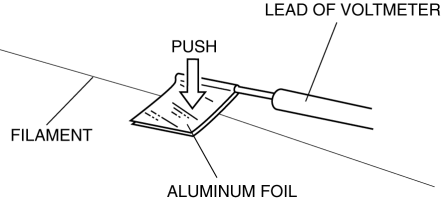
CAUTION:
-
Directly touching the rear window defroster filament with the lead of the tester could damage it. Wrap aluminum foil around the end of the lead and inspect the filament by touching it with the foil.
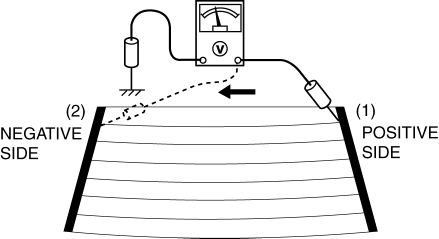
3. Connect the positive lead of the tester to the positive side of each filament and the negative lead to ground.
4. Gradually slide the positive lead from the positive side to the negative side and verify that the voltage decreases accordingly.
-
If the voltage changes rapidly, the filament has a malfunction. Repair the filament.
|
Measured part
|
Voltage (Reference)
|
|
(1) to (2) |
Approx. 11 V to 0 V |
 Base Removal
1. Remove the rearview mirror..
2. Wind each end of a wire around a bar.
WARNING:
Using the piano wire with bare hands can cause injury. Always wear gloves
when using the piano wire ...
 Filament Repair
1. Clean the filament using isopropyl alcohol.
2. Attach tape to both sides of the filament.
3. Using a small brush or marking pen, apply silver paint.
4. After 2—3 min, carefully remove t ...
Other materials:
Rear Door Speaker Inspection
1. Disconnect the negative battery cable..
2. Remove the rear door trim..
3. Remove the rear door speaker..
4. Verify the resistance between the rear door speaker terminals.
If not within the specification, replace the rear door speaker.
Resistance
Without Bose ...
Engine Disassembly/Assembly [Skyactiv G 2.0]
CAUTION:
When the transaxle is installed, do not suspend the engine. Otherwise, the
SST installation area of the cylinder head may be damaged due to excess weight.
Only suspend the engine after separating the engine and transaxle.
Applying excessive force (force of 100 N {10.2 ...
LTA (Lane Tracing Assist)
LTA functions
In the Subaru Solterra, when driving on roads with clearly visible lane
markings and with dynamic radar cruise control activated, the system uses a
front camera and radar sensors to detect lane boundaries as well as surrounding
and preceding vehicles. Based on this data, t ...
