
Mazda 3 Service Manual: Filament Repair
1. Clean the filament using isopropyl alcohol.
2. Attach tape to both sides of the filament.
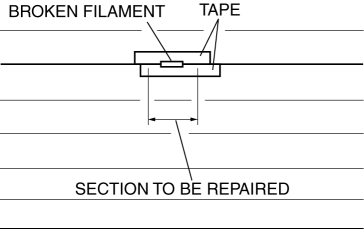
3. Using a small brush or marking pen, apply silver paint.
4. After 2—3 min,
carefully remove the tape without damaging the applied area.
CAUTION:
-
Do not operate the rear window defroster until the paint is completely dry. It may cause other malfunctions if it is used before the paint is dry.
5. Dry the repaired part according to the following procedure.
-
When the room temperature is 25 °C {77 °F},
leave it as it is for 24 h.
-
When a hot air blower is used, dry with the 150 °C {302 °F}
air for 30 min.
 Filament Inspection
1. Turn the ignition switch to the ON position.
2. Turn the rear window defroster switch on.
CAUTION:
Directly touching the rear window defroster filament with the lead of the
teste ...
 Outer Mirror Garnish Removal/Installation
1. Disconnect the negative battery cable..
2. Remove the outer mirror glass from the outer mirror..
3. Pinch the end of the tab which is visible, and release the tab by pressing
it toward the ve ...
Other materials:
Operating the Driver's Power
Window
Normal opening/closing
To open the window to the desired
position, lightly hold down the switch.
To close the window to the desired
position, lightly pull up the switch.
Auto-opening/closing
To fully open the window automatically,
press the switch completely down, then
release. The win ...
Manifold Absolute Pressure (Map) Sensor/Boost Air Temperature Sensor Removal/Installation
[Mzr 2.3 Disi Turbo]
NOTE:
Because the boost air temperature sensor is integrated in the MAP sensor,
replacing the boost air temperature sensor includes replacement of the MAP sensor/boost
air temperature sensor.
1. Remove the battery cover..
2. Disconnect the negative battery cable..
3. Remove t ...
Front Outer Handle Removal/Installation
1. To access the glass installation bolt, position the front door glass so that
the distance from the top of the front door glass to the upper part of the front
beltline molding is approx. 80 mm {3.1 in}.
2. Disconnect the negative battery cable..
3. Remove the following parts:
a. Inne ...
