
Mazda 3 Service Manual: Hazard Warning Switch Inspection
1. Disconnect the negative battery cable..
2. Remove the center panel..
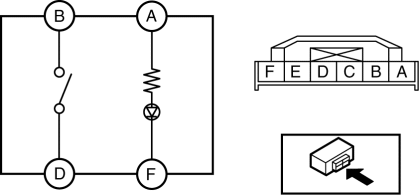
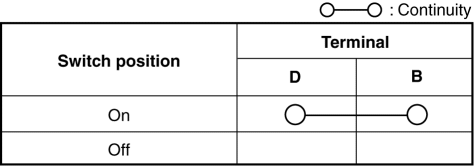
3. Verify that the continuity between the hazard switch terminals is as indicated in the table.
-
If not as indicated in the table, replace the hazard warning switch.
4. Apply battery voltage to hazard switch terminal A, and connect terminal F to ground.
5. Verify that the LED illuminates.
-
If there is any malfunction, replace the hazard warning switch.
 Front Fog Light Switch Inspection
1. Disconnect the negative battery cable..
2. Remove the column cover..
3. Remove the light switch..
4. Verify that the continuity between the front fog light switch terminals is
as indicated ...
 Hazard Warning Switch Removal/Installation
1. Disconnect the negative battery cable..
2. Remove the center panel..
3. Remove in the order indicated in the table.
1
Screw
2
Hazard wa ...
Other materials:
Traffic Jam Assist
Function Outline
In the Subaru Solterra, Traffic Jam Assist is an advanced driver support feature
designed to reduce fatigue during congested driving conditions. After confirming
operating conditions, the system can assist with lane centering, controlled acceleration
and deceleration, as well ...
Service Cautions
Injury/damage Prevention Precautions
Depending on the vehicle, the cooling fan may operate suddenly even when
the ignition is switched to off. Therefore, keep hands and tools away from the
cooling fan even if the cooling fan is not operating to prevent injury to personnel
or damage t ...
Torque Converter Clutch (TCC) Non Operation [Fw6 A EL]
TROUBLESHOOTING ITEM
Torque converter clutch (TCC) non-operation
DESCRIPTION
TCC does not operate when vehicle reaches TCC operation range.
POSSIBLE CAUSE
Signal malfunction
...
