
Mazda 3 Service Manual: Interior Light Removal/Installation
1. Disconnect the negative battery cable..
2. Remove the rain sensor cover. (Vehicles with auto light/wiper system).
3. Remove the following parts:
a. Sunroof seaming welt (vehicles with sunroof)
b. A-pillar trim.
c. Front scuff plate.
d. Rear scuff plate.
e. B-pillar lower trim.
f. Upper anchor of the front seat belt.
g. B-pillar upper trim.
h. Rear seat cushion.
i. Tire house trim.
j. Trunk side upper trim (5HB).
k. C-pillar trim.
l. Map light.
m. Sunvisor.
n. Assist handle.
o. Headliner.
4. Pull in the direction of the arrows and detach the tabs.
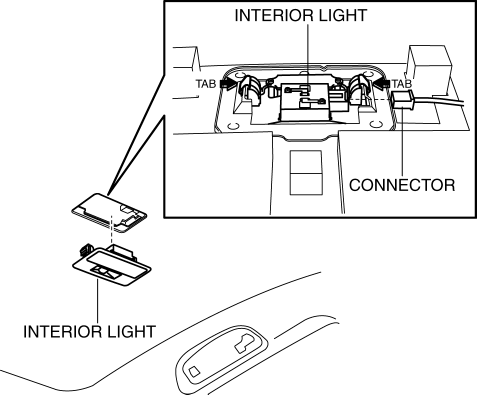
5. Disconnect the connector.
6. Remove the interior light.
7. Install in the reverse order of removal.
NOTE:
-
After installing the wiring harness, reinforce the urethane that was cut when removing the valve housing with vinyl tape.
 Interior Light Bulb Removal/Installation
1. Disconnect the negative battery cable..
2. Insert a tape-wrapped fastener remover into the service hole and pry with
the screwdriver in the direction shown by the arrow to remove the lens.
...
 Map Light Bulb Removal/Installation
1. Disconnect the negative battery cable..
2. Insert a tape-wrapped fastener remover into the service hole and pry with
the screwdriver in the direction shown by the arrow to remove the lens.
...
Other materials:
No.16 Judder Upon Torque Converter Clutch (TCC) Operation [FS5 A EL]
16
Judder upon torque converter clutch (TCC) operation
DESCRIPTION
Vehicle jolts when TCC is engaged.
POSSIBLE CAUSE
Poor TCC engagement due to either slippage because the TCC is stuck
...
Spark Plug Inspection [Mzr 2.0, Mzr 2.5]
Specification
Spark plug type
LFJD-18110, L3Y2-18110
Plug Gap Inspection
CAUTION:
To avoid possible damage to the tip, do not adjust the spark plug gap. (L3Y2-18110)
To prevent damaging the tip, use a wire type plug gap gauge when inspecting
the spark plug gap. (L3 ...
Sunlight/Temperature Sensor
The climate control system measures
inside and outside temperatures, and
sunlight. It then sets temperatures inside
the passenger compartment accordingly.
CAUTION
Do not obstruct either sensor,
otherwise the climate control system
will not operate properly.
...
