
Mazda 3 Service Manual: Key Reminder Switch Removal/Installation
1. Disconnect the negative battery cable. (See BATTERY REMOVAL/INSTALLATION [MZR 2.0, MZR 2.5].)(See BATTERY REMOVAL/INSTALLATION [MZR 2.3 DISI Turbo].)(See BATTERY REMOVAL/INSTALLATION [SKYACTIV-G 2.0].)
2. Remove the column cover. (See COLUMN COVER REMOVAL/INSTALLATION.)
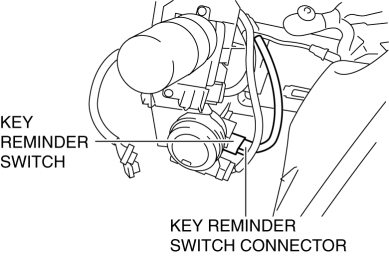
3. Disconnect the key reminder switch connector.
4. Detach the key reminder switch tabs.
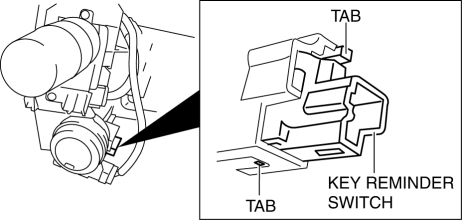
5. Remove the key reminder switch.
6. Install in the reverse order of removal.
 Key Reminder Switch Inspection
1. Disconnect the negative battery cable. (See BATTERY REMOVAL/INSTALLATION [MZR
2.0, MZR 2.5].)(See BATTERY REMOVAL/INSTALLATION [MZR 2.3 DISI Turbo].)(See BATTERY
REMOVAL/INSTALLATION [SKYACTIV- ...
 Power Systems Personalization Features Setting Procedure
NOTE:
Use the IDS (laptop PC) because the PDS (Pocket PC) does not support the
POWER SYSTEMS PERSONALIZATION FEATURES SETTING PROCEDURE.
1. Connect the M-MDS to the DLC–2.
2. ...
Other materials:
Parameter Setting Procedure When Tire Size Is Changed
CAUTION:
If the wheel and tire sizes are changed, a discrepancy with the speedometer
needle whereby it exceeds the allowable range could result in a malfunction.
If the wheel and tire sizes are changed, perform the following procedure to
change the tire size parameter setting.
...
Generator Inspection [Mzr 2.0, Mzr 2.5]
CAUTION:
Do not apply direct battery positive voltage to generator terminal D, otherwise
it could cause damage to the internal parts (power transistor) of the generator.
Generator Warning Light
1. Verify that the battery is fully charged.
2. Verify that the drive belt is correct. ...
Side Turn Light Inspection
Side turn light illumination inspection
1. Disconnect the negative battery cable..
2. Remove the outer mirror glass..
3. Remove the outer mirror garnish..
4. Remove the side turn light..
5. Connect the battery voltage as shown in the figure.
If the side turn light does illuminat ...
