
Mazda 3 Service Manual: Key Reminder Switch Inspection
1. Disconnect the negative battery cable. (See BATTERY REMOVAL/INSTALLATION [MZR 2.0, MZR 2.5].)(See BATTERY REMOVAL/INSTALLATION [MZR 2.3 DISI Turbo].)(See BATTERY REMOVAL/INSTALLATION [SKYACTIV-G 2.0].)
2. Remove the column cover. (See COLUMN COVER REMOVAL/INSTALLATION.)
3. Disconnect the key reminder switch connector.
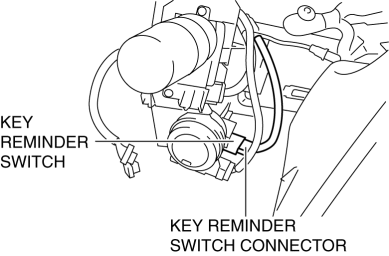
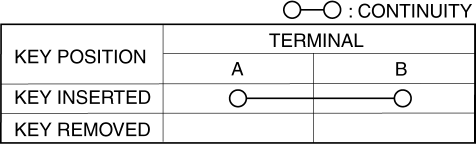
4. Verify that the continuity between the key reminder switch terminals is as indicated in the table.
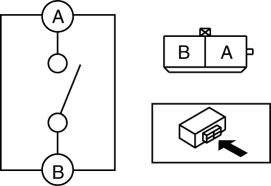
-
If not as indicated in the table, replace the key reminder switch.
 Jacking Positions, Vehicle Lift (2 Supports) And Safety Stand (Rigid Rack) Positions
Jacking Positions
WARNING:
Improperly jacking a vehicle is dangerous. The vehicle can slip off the jack
and cause serious injury. Use only the correct front and rear jacking points
and ...
 Key Reminder Switch Removal/Installation
1. Disconnect the negative battery cable. (See BATTERY REMOVAL/INSTALLATION [MZR
2.0, MZR 2.5].)(See BATTERY REMOVAL/INSTALLATION [MZR 2.3 DISI Turbo].)(See BATTERY
REMOVAL/INSTALLATION [SKYACTIV- ...
Other materials:
Operating Tips for iPod
This unit supports playback of music files
recorded to an iPod.
iPod is a trademark of Apple Inc.,
registered in the U.S. and other
countries.
The iPod may not be compatible
depending on the model or OS version. In
this case, an error message is displayed.
CAUTION
Remove the iPo ...
Check Valve (One Way) Inspection [Mzr 2.3 Disi Turbo]
1. Disconnect the vacuum hose connected between the check valve and the purge
solenoid valve from the purge solenoid valve..
2. Disconnect the vacuum hose connected between the check valve (one-way) and
the intake manifold from the intake manifold..
3. Blow through the check valve (one-way) ...
Moonroof
The moonroof can be opened or closed
electrically only when the ignition is
switched ON.
WARNING
Do not let passengers stand up or
extend part of the body through the
open moonroof while the vehicle is
moving:
Extending the head, arms, or other
parts of the body throu ...
