
Mazda 3 Service Manual: Liftgate Upper Trim Removal/Installation
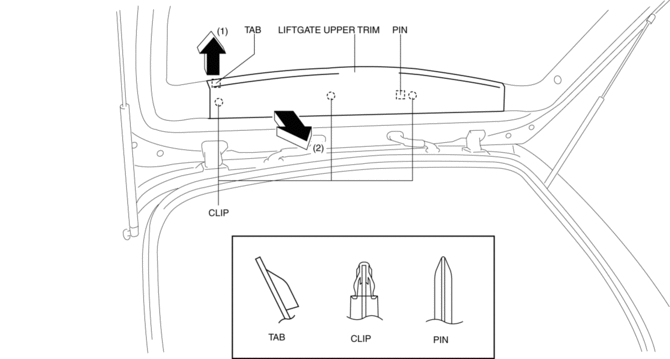
1. Detach tab while pulling the liftgate upper trim in the direction of the arrow (1) shown in the figure, then detach clips and pin while pulling in the direction of the arrow (2).
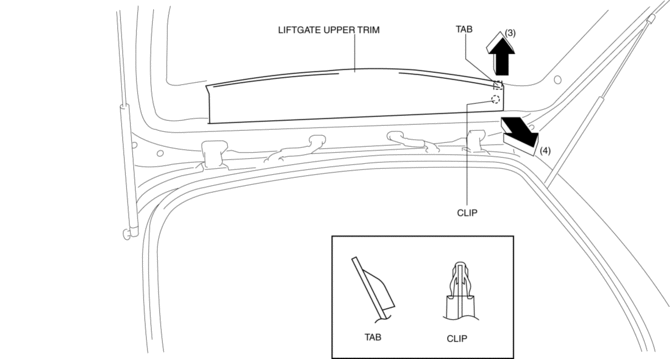
2. Detach tab while pulling the liftgate upper trim in the direction of the arrow (3) shown in the figure, then detach clip while pulling in the direction of the arrow (4).
3. Remove the liftgate upper trim.
4. Install in the reverse order of removal.
 Liftgate Side Trim Removal/Installation
1. Remove the liftgate upper trim..
2. Pull the point A of the strap hanger as shown in the figure.
3. Remove the strap hanger.
4. Remove the fastener.
5. Pull the liftgate side trim in th ...
 Rear Door Checker Removal/Installation
1. Fully close the rear door glass.
2. Disconnect the negative battery cable..
3. Remove the rear door trim..
4. Remove the rear door speaker..
5. Remove the bolt A.
6. Remove the bolts ...
Other materials:
Front Side Marker/Front Turn Light Bulb Removal/Installation
1. Disconnect the negative battery cable..
2. Slightly bend back the front mudguard..
3. Rotate the front side marker/front turn light socket in the direction of the
arrow shown in the figure.
4. Remove the front side marker/front turn light bulb.
5. Install in the reverse order of ...
Dashboard Illumination
When the position lights are turned
on with the ignition switched ON,
the brightness of the instrument panel
illumination is dimmed.
NOTE
When the position lights are turned on,
the position lights indicator light in the
instrument cluster turns on.
Refer to Headlights on .
The brightness ...
Reading this manual
Explains symbols used in this manual
Symbols in this manual
WARNING:
In the Subaru Solterra Owner’s Manual, this symbol highlights
critical information that must be followed without exception. Ignoring such instructions
may result in severe injury or even loss of life. Always pay close ...
