
Mazda 3 Owners Manual: Opening the Hood
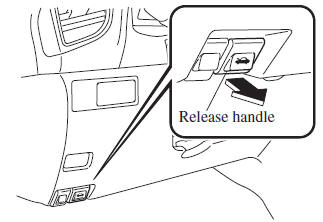
- With the vehicle parked, pull the release handle to unlock the hood.
- Insert your hand into the hood opening, slide the latch lever to the right, and lift up the hood.
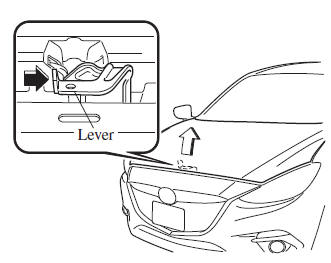
NOTE The lever is located a little to the left of center when facing the vehicle.
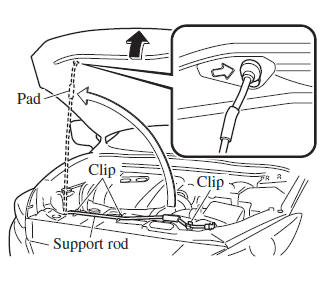
- Grasp the support rod in the padded area and secure it in the support rod hole indicated by the arrow to hold the hood open.
 Hood
Hood
WARNING
Always check that the hood is closed
and securely locked:
A hood that is not closed and securely
locked is dangerous as it could fl y open
while the vehicle is moving and ...
 Closing the Hood
Check under the hood area to make
certain all filler caps are in place and all
loose items (e.g. tools, oil containers,
etc.) have been removed.
Lift the hood, grasp the padded area on
th ...
Other materials:
Transaxle Oil Replacement [A26 M R]
1. Park the vehicle on level ground.
2. Remove the aerodynamic under cover No.2..
3. Remove the drain plug and gasket.
4. Drain the oil into a suitable container.
5. Install a new gasket and the drain plug.
Tightening torque
28—51 N·m {2.9—5.2 kgf·m, 21—37 ft·lbf}
...
Schedule 2
U.S.A. (severe driving conditions) and Puerto Rico residents
Chart symbols:
I: Inspect: Inspect and clean, repair, adjust, fill up, or replace if
necessary.
R: Replace
L : Lubricate
T: Tighten
Remarks:
*1 Engine oil flexible maintenance is available for U.S.A. and Puerto Rico
resi ...
Battery Inspection [Skyactiv G 2.0]
WARNING:
Since battery acid is toxic, be careful when handling the battery.
Since battery acid is highly corrosive, be careful not to allow it to contact
clothing or the vehicle.
In case battery acid contacts skin, eyes, or clothing, flush it immediately
with running wa ...
