
Mazda 3 Owners Manual: Parking in an Emergency
The hazard warning lights should always be used when you stop on or near a roadway in an emergency
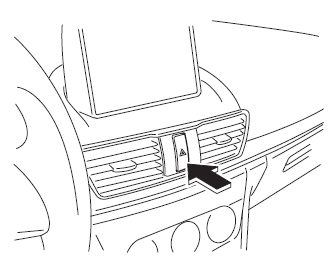
The hazard warning lights warn other drivers that your vehicle is a traffic hazard and that they must take extreme caution when near it.

Depress the hazard warning flasher and all the turn signals will flash. The hazard warning indicator lights in the instrument cluster flash simultaneously.
NOTE
- The turn signals do not work when the hazard warning lights are on.
- Check local regulations about the use of hazard warning lights while the vehicle is being towed to verify that it is not in violation of the law.
 If Trouble Arises
Helpful information on what to do if a problem arises with the vehicle. ...
 Flat Tire
...
Other materials:
Air Bleeding
CAUTION:
If the strainer is removed, impurities may penetrate the power steering system
and damage it. To prevent this, always bleed air with the strainer installed.
Do not maintain the steering wheel fully turned for 5 s or more. The oil
temperature could rise and damage ...
Base Removal
1. Remove the rearview mirror..
2. Wind each end of a wire around a bar.
WARNING:
Using the piano wire with bare hands can cause injury. Always wear gloves
when using the piano wire.
NOTE:
Use a long sawing action to spread the work over the whole length of the
pi ...
High Mount Brake Light Bulb Removal/Installation
4SD
1. Disconnect the negative battery cable..
2. Remove the trunk lid trim..
3. Remove in the order indicated in the table.
1
Connector
2
Socket
3
High-mount brake light bulb
4. Install in the rev ...
