
Mazda 3 Service Manual: Passenger Compartment Temperature Sensor Inspection [Full Auto Air Conditioner]
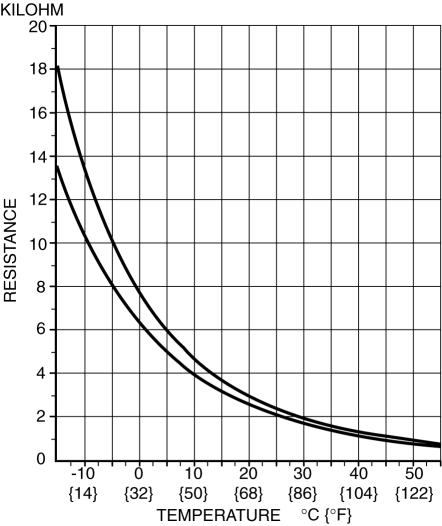
1. Measure the temperature around the passenger compartment temperature sensor and measure the resistance between passenger compartment temperature sensor terminals B and D.
-
If the characteristics of the passenger compartment temperature sensor are not as shown in the graph, replace the passenger compartment temperature sensor.
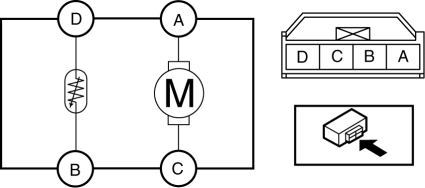
2. Connect battery positive voltage to passenger compartment temperature sensor terminal A and connect terminal C to ground to verify fan operation.
-
If there is any malfunction, replace the passenger compartment temperature sensor.
 Manifold Absolute Pressure (Map) Sensor/Boost Air Temperature Sensor Removal/Installation
[Mzr 2.3 Disi Turbo]
Manifold Absolute Pressure (Map) Sensor/Boost Air Temperature Sensor Removal/Installation
[Mzr 2.3 Disi Turbo]
NOTE:
Because the boost air temperature sensor is integrated in the MAP sensor,
replacing the boost air temperature sensor includes replacement of the MAP sensor/boost
air temperature se ...
 Passenger Compartment Temperature Sensor Removal/Installation [Full Auto Air
Conditioner]
Passenger Compartment Temperature Sensor Removal/Installation [Full Auto Air
Conditioner]
1. Disconnect the negative battery cable..
2. Remove the following parts:
a. Front scuff plate.
b. Front side trim.
c. Dashboard under cover.
d. Upper panel.
e. Shift lever knob (MTX).
f ...
Other materials:
Throttle Position (TP) Sensor Inspection [Mzr 2.0, Mzr 2.5]
Voltage Inspection
CAUTION:
The inspection cannot be performed with this method correctly if there is
a malfunction of the APP sensor or throttle valve actuator. Verify that no DTCs
related to the APP sensor or throttle valve actuator are stored before the inspection.
NOTE:
...
Storage Compartments
WARNING
Keep storage boxes closed when
driving:
Driving with the storage boxes open is
dangerous. To reduce the possibility of
injury in an accident or a sudden stop,
keep the storage boxes closed when
driving.
Do not put articles in storage spaces
with no lid:
...
Air Bag Module And Pre Tensioner Seat Belt Deployment Procedures [Standard Deployment
Control System]
WARNING:
A live (undeployed) air bag module or pre-tensioner seat belt may accidentally
operate (deploy) when it is disposed of and cause serious injury. Do not dispose
of a live (undeployed) air bag module and pre-tensioner seat belt. If the SSTs
(Deployment tool and Adapter harn ...
