
Mazda 3 Service Manual: Rear Door Latch And Lock Actuator Removal/Installation
1. Fully open the rear door glass.
2. Disconnect the negative battery cable..
3. Remove the following parts:
a. Rear door trim.
b. Rear inner handle.
c. Rear door speaker.
d. Rear power window motor.
e. Rear door glass.
4. Remove the screw.
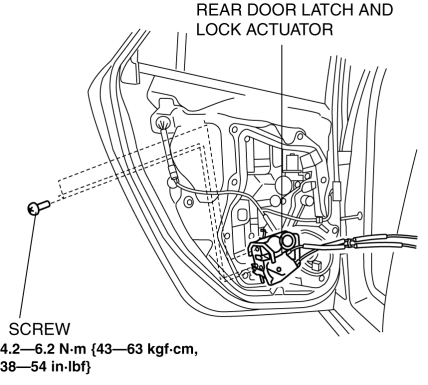
5. Remove the rear door latch and lock actuator.
6. Install in the reverse order of removal.
 Rear Door Latch And Lock Actuator Inspection
1. The following actuator and switch are integrated with the rear door latch
and lock actuator. Inspect the rear door latch and lock actuator according to each
inspection procedure for the followi ...
 Rear Door Latch Switch Inspection
1. Fully open the rear door glass.
2. Disconnect the negative battery cable..
3. Remove the following parts:
a. Rear door trim.
b. Rear inner handle.
c. Rear door speaker.
d. Rear power wi ...
Other materials:
Setting the tire pressure
■ When you need to setting the tire pressure
For the Subaru Solterra, recalibration of the tire pressure system is required
in specific situations to ensure accurate monitoring and optimal driving safety.
The tire pressure setting procedure should be performed whenever system conditions
cha ...
Transaxle Range (TR) Switch Adjustment [FS5 A EL]
CAUTION:
Water or foreign objects entering the connector can cause a poor connection
or corrosion. Be sure not to drop water or foreign objects on the connector
when disconnecting it.
1. Engage the parking brake and use wheel chocks at the front and rear of the
wheels.
2. Shi ...
Glossary of Terms
Tire Placard: A label indicating the OE tire sizes, recommended inflation
pressure, and the
maximum weight the vehicle can carry.
Tire Identification Number (TIN): A number on the sidewall of each tire
providing
information about the tire brand and manufacturing plant, tire size, and date o ...
