
Mazda 3 Owners Manual: Anchor Bracket
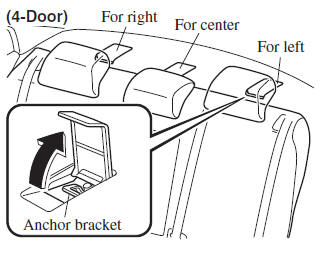
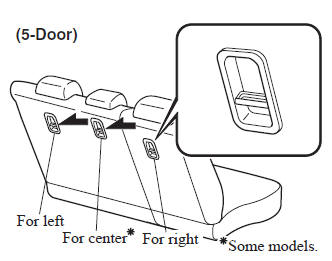
Anchor brackets for securing childrestraint systems are equipped in the vehicle. Locate each anchor position using the illustration.
To install a child-restraint system, always follow the instruction manual accompanying the child-restraint system.
Anchor bracket location
Use the indicated anchor bracket locations when installing a child-restraint system equipped with a tether.
| WARNING
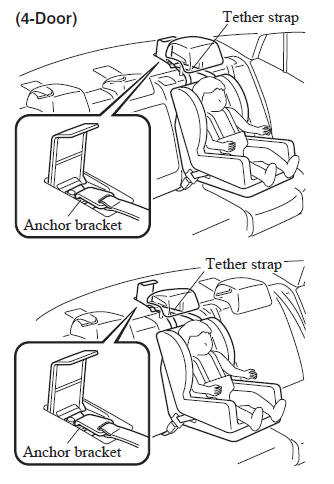
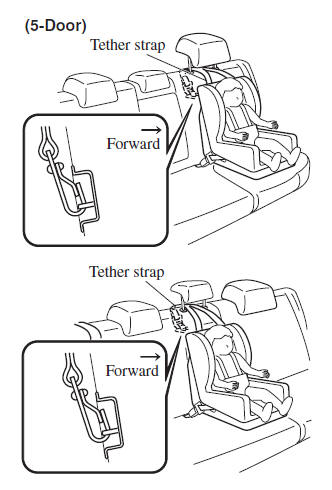
Always attach the tether strap to the
correct tether anchor position:
Attaching the tether strap to the
incorrect tether anchor position is
dangerous. In a collision, the tether
strap could come off and loosen the
child-restraint system. If the childrestraint
system moves it could result
in death or injury to the child.
Always route the tether strap between the head restraint and the seatback: Routing the tether strap on top of the head restraint is dangerous. In a collision the tether strap could slide off the head restraint and loosen the childrestraint system. The child-restraint system could move which may result in death or injury to the child. |
 Installing Child-Restraint Systems
Accident statistics reveal that a child is
safer in the rear seat. The front passenger's
seat is clearly the worst choice for any
child under 12, and with rear-facing childrestraint
systems it is ...
 Using Automatic Locking Mode
Follow these instructions when using a child-restraint system, unless you are
attaching a LATCH-equipped childrestraint system to the rear LATCH lower
anchors. Refer to “Using LATCH Lower Anchor ...
Other materials:
Schedule 1
Chart symbols:
I: Inspect: Inspect and clean, repair, adjust, fill up, or replace if
necessary.
R: Replace
L : Lubricate
T: Tighten
Remarks:
*1 Use of FL-22 is recommended when replacing engine coolant. Using engine
coolant other than FL-22 may
cause serious damage to the engine and c ...
Power Systems Personalization Features Setting Procedure
NOTE:
Use the IDS (laptop PC) because the PDS (Pocket PC) does not support the
POWER SYSTEMS PERSONALIZATION FEATURES SETTING PROCEDURE.
1. Connect the M-MDS to the DLC–2.
2. After the vehicle is identified, select the following items from the initial
screen of the M-MDS. ...
Power Windows
The ignition must be switched ON for the
power windows to operate.
WARNING
Make sure the opening is clear before
closing a window:
Closing a power window is dangerous.
A person's hands, head, or even neck
could be caught by the window and
result in serious injury or even d ...
