
Mazda 3 Service Manual: Rear Door Speaker Removal/Installation
1. Disconnect the negative battery cable..
2. Remove the rear door trim..
3. Disconnect the connector.
Without Bose®
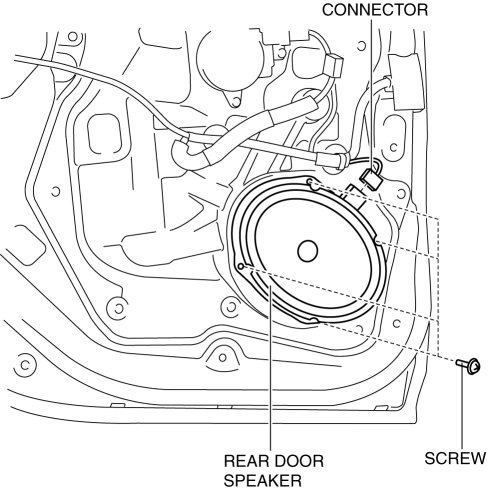
With Bose®
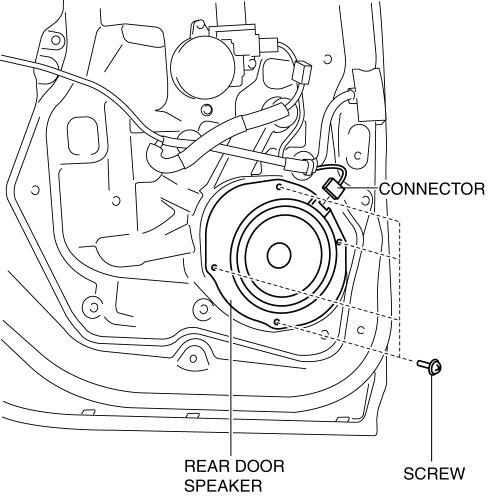
4. Remove the screw.
5. Remove the rear door speaker in the direction of the arrow shown in the figure.
Without Bose®
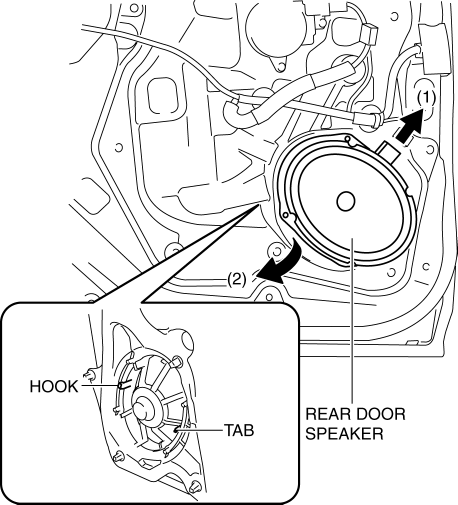
With Bose®
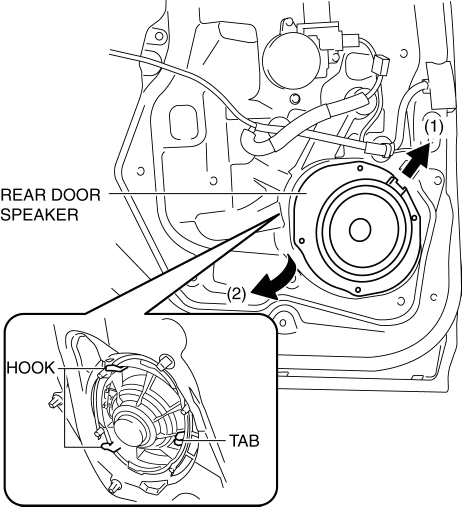
6. Install in the reverse order of removal.
 Rear Door Speaker Inspection
1. Disconnect the negative battery cable..
2. Remove the rear door trim..
3. Remove the rear door speaker..
4. Verify the resistance between the rear door speaker terminals.
If not w ...
 Rear Speaker Inspection
4SD
1. Disconnect the negative battery cable..
2. Remove the following parts:
a. Rear seat cushion.
b. Rear scuff plate.
c. Tire house trim.
d. C-pillar trim.
e. Rear package trim.
f. R ...
Other materials:
Forward Sensing Camera
(FSC)
Your vehicle is equipped with a Forward Sensing Camera (FSC). The Forward
Sensing
Camera (FSC) is positioned near the rearview mirror and used by the following
systems.
High Beam Control System (HBC)
Lane Departure Warning System (LDWS)
The Forward Sensing Camera (FSC) determines t ...
Transaxle Oil Inspection [A26 M R]
1. Park the vehicle on level ground.
2. Remove the aerodynamic under cover No.2..
3. Remove the oil level plug and gasket.
4. Verify that the oil is near the brim of the plug port.
If the oil level is lower than the low level, add the specified amount and
type of oil through the ...
Front Seat Belt Removal/Installation [Standard Deployment Control System]
WARNING:
Handling the front seat belt (pre-tensioner seat belt) improperly can accidentally
deploy the pre-tensioner seat belt, which may seriously injure you. Read the
air bag system service warnings and cautions before handling the front seat
belt..
WARNING:
Th ...
