
Mazda 3 Service Manual: Rear Door Speaker Inspection
1. Disconnect the negative battery cable..
2. Remove the rear door trim..
3. Remove the rear door speaker..
4. Verify the resistance between the rear door speaker terminals.
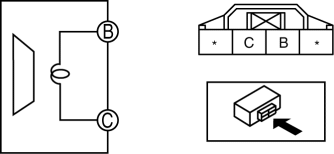
-
If not within the specification, replace the rear door speaker.
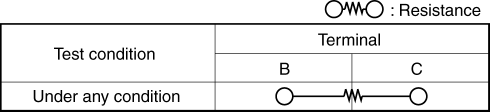
-
Resistance
-
Without Bose®: 3.4—4.6 ohms
-
With Bose®: 2.89—3.91 ohms
 Rear Center Speaker Removal/Installation
1. Disconnect the negative battery cable..
2. Remove the following parts:
a. Rear seat cushion.
b. Rear scuff plate.
c. Tire house trim.
d. C-pillar trim.
e. Rear package trim.
3. Remove ...
 Rear Door Speaker Removal/Installation
1. Disconnect the negative battery cable..
2. Remove the rear door trim..
3. Disconnect the connector.
Without Bose®
With Bose®
4. Remove the screw.
5. Remove the rear door speaker ...
Other materials:
Compression Inspection [Skyactiv G 2.0]
WARNING:
Hot engines and oil can cause severe burns. Be careful not to burn yourself
during removal/installation of each component.
Fuel vapor is hazardous. It can very easily ignite, causing serious injury
and damage. Always keep sparks and flames away from fuel.
Fuel ...
Auxiliary Jack/Usb Port
NOTE:
“iPod” is a registered trademark of Apple Inc. in the United States and other
countries.
Purpose, Function
The Auxiliary jack/USB port outputs the audio signals of commercially-available
portable audio, a USB device, or an iPod connected to the Auxiliary jack/USB ...
Rear Washer Hose Removal/Installation
1. Disconnect the negative battery cable..
2. Remove the front mudguard (RH)..
3. Disconnect rear washer hose A from the washer motor.
4. Remove the rear washer hose A from clip A, B, C, D, E, F, G.
5. Disconnect joint pipes and remove rear washer hose A.
6. Partially peel back the sea ...
