
Mazda 3 Service Manual: Rear Trailing Link Removal/Installation
CAUTION:
-
Performing the following procedures without first removing the ABS wheel-speed sensor may possibly cause an open circuit in the wiring harness if it is pulled by mistake. Before performing the following procedures, disconnect the ABS wheel-speed sensor wiring harness connector (axle side) and fix the wiring harness to an appropriate place where it will not be pulled by mistake while servicing the vehicle.
1. Disconnect the auto leveling sensor link lower side. (Vehicles with AFS).
2. Remove the rear coil spring..
3. Remove in the order indicated in the table.
4. Install in the reverse order of removal.
5. Inspect the wheel alignment and adjust it if necessary..
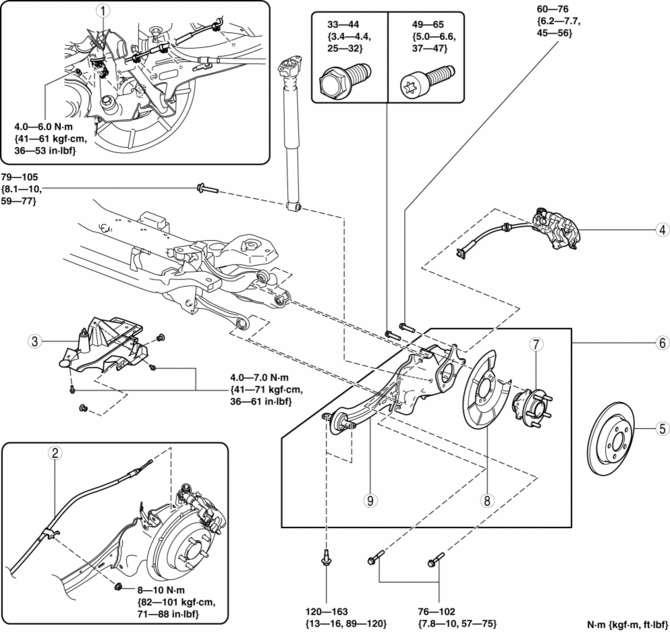
|
1 |
Rear ABS wheel-speed sensor wiring harness (See Rear ABS Wheel-speed Sensor Wiring Harness Installation Note.) |
|
2 |
Rear parking brake cable |
|
3 |
Under cover |
|
4 |
Brake caliper component . |
|
5 |
Disc plate |
|
6 |
Rear trailing link component (See Rear Trailing Link Component Removal Note.) (See Rear Trailing Link Component Installation Note.) |
|
7 |
Rear wheel hub component |
|
8 |
Dust cover |
|
9 |
Rear trailing link |
Brake Caliper Component Removal Note
1. Remove the brake caliper component and suspend it out of the way using a cable.
Rear Trailing Link Component Removal Note
WARNING:
-
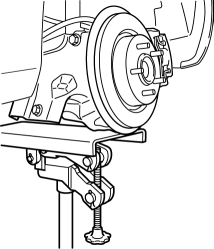
Removing the rear trailing link component is dangerous. The rear trailing link component could fall and cause serious injury or death. Verify that the jack securely supports the rear trailing link component.
1. Support the rear trailing link component using a jack.
2. Remove the rear trailing link front side bolts.
3. Remove the rear shock absorber lower side bolt.
4. Remove the rear lateral link outer side bolt.
5. Remove the rear upper arm outer side bolt.
6. Remove the rear trailing link component.
Rear Trailing Link Component Installation Note
WARNING:
-
Installing the rear trailing link component is dangerous. The rear trailing link component could fall and cause serious injury or death. Verify that the jack securely supports the rear trailing link component.
1. Support the trailing link component using a jack.
2. Install the rear upper arm outer side bolt.
3. Install the rear lateral link outer side bolt.
4. Install the rear shock absorber lower side bolt.
5. Tighten the trailing link front side bolts.
Rear ABS Wheel-speed Sensor Wiring Harness Installation Note
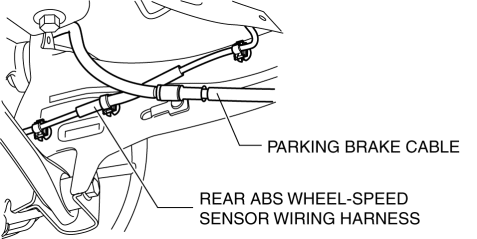
1. Pass the rear ABS wheel-speed sensor wiring harness outside the rear parking brake cable as shown in the figure.
2. Install the rear ABS wheel-speed sensor wiring harness.
 Precaution
Intermittent Concern Troubleshooting
Vibration method
If malfunction occurs or becomes worse while driving on a rough road or when
the engine is vibrating, perform the steps below.
NO ...
 Rear Wheel Hub Bolt Replacement
1. Remove the brake calliper component and disc plate..
2. Remove the wheel hub bolt using the SST as shown in the figure.
3. Place a new wheel hub bolt in the wheel hub.
4. Install the whee ...
Other materials:
Variable Tumble Shutter Valve Actuator Inspection [Mzr 2.0, Mzr 2.5]
Operation Inspection
1. Remove the air hose..
2. Disconnect the vacuum hose from the variable tumble shutter valve actuator.
3. Connect a vacuum pump to the variable tumble shutter valve actuator.
NOTE:
Covered with a hood, the rod of the variable tumble shutter valve actuator
...
Theft Deterrent System Reading Freeze Frame Data
1. Connect the M-MDS (IDS) to the DLC–2.
2. After the vehicle is identified, select the following items from the initialization
screen of the IDS.
Select “Body”.
Select "Burglar Service Functions".
3. Then, select the following item from the screen menu. ...
Keyless Antenna Removal/Installation
Interior, Front
1. Disconnect the negative battery cable..
2. Remove the following parts:
a. Upper panel.
b. Shift knob (MTX).
c. Selector lever knob (ATX).
d. Shift panel.
e. Side wall.
f. Center panel.
g. Audio unit.
h. Rear heat duct (1).
3. Disconnect the connector.
4. ...
