
Mazda 3 Service Manual: Roof Molding Installation
1. Install the roof molding to the front T-stud.
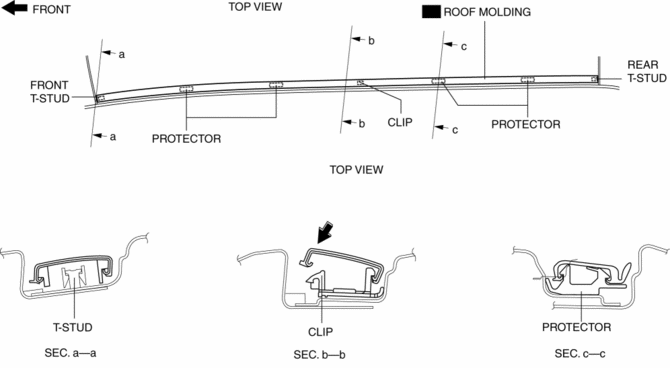
2. Hook the roof molding to the clip and attach the roof molding while pressing it in the direction of the arrow shown in the figure.
3. Install the roof molding to the rear T-stud.
4. Press in the protector installation positions shown in the figure and firmly adhere them to the body.
 Headliner Removal/Installation
1. Shift to the D (ATX) or 4th gear (MTX) position. (4SD)
2. Disconnect the negative battery cable..
3. Remove the rain sensor cover. (Vehicles with auto light/wiper system).
4. Disconnect the r ...
 Roof Molding Removal
1. Insert a fastener remover in the position shown in the figure.
2. Rotate the flathead screwdriver in the direction of the arrow (1) shown in
the figure and remove the roof molding from the T-st ...
Other materials:
Parking Brake Lever Inspection
Stroke Inspection
1. Pump the brake pedal a few times.
2. Pull the parking brake lever two to three times.
3. Inspect the parking brake stroke by slowly pulling at point A 50 mm {1.97
in} from the end of the parking brake lever with a force of 98 N {10 kgf,
22 lbf} and counting the number o ...
Seat Belt Precautions
Seat belts help to decrease the possibility of severe injury during accidents
and sudden
stops. Mazda recommends that the driver and all passengers always wear seat
belts.
(U.S.A. and Canada)
All of the seat belt retractors are designed to keep the lap/shoulder belts
out of the way when
no ...
Brake Hose (Front) Removal/Installation [Mzr 2.3 Disi Turbo]
1. Remove in the order indicated in the table.
2. Install in the reverse order of removal.
3. Add brake fluid, bleed the brakes, and inspect for leakage after the installation
has been completed..
1
Brake pipe
2
Clip
3
...
