
Mazda 3 Service Manual: Parameter Setting Procedure When Tire Size Is Changed
CAUTION:
-
If the wheel and tire sizes are changed, a discrepancy with the speedometer needle whereby it exceeds the allowable range could result in a malfunction. If the wheel and tire sizes are changed, perform the following procedure to change the tire size parameter setting.
-
The same parameters should be set in “Tire dimension”, “Tire Circumference”, and “Tire Size”.
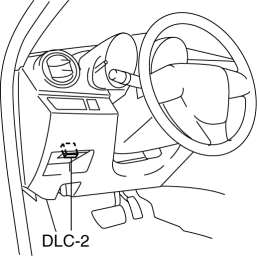
1. Connect the M-MDS to DLC-2.
2. After the vehicle is identified, select the following item from the initialization screen of the M-MDS.
-
Select “Module Programming”.
3. Select the items from the screen menu.
-
Select “Programmable Parameters”.
-
Select “Tire Size”.
4. Select an item name, and then select the option.
-
Select “Tire Size”.
-
Tire dimension (195/70R15, 205/50R17, 195/65R15, 205/55R16, 225/40R18)
-
Tire Circumference (195/70R15, 205/50R17, 195/65R15, 205/55R16, 225/40R18)
5. Select the items from the screen menu.
-
Select “Programmable Parameters”.
-
Select “Tire Size/Axle Ratio”.
6. Select an item name, and then select the option.
-
Select “Tire Size/Axle Ratio”.
-
Tire Size (195/70R15, 225/40R18, 195/65R15, 205/50R17, 205/55R16)
 Malfunctioning Wheel Unit Identification
NOTE:
The tire pressure monitoring system (TPMS) does not identify the location
of the malfunctioning wheel unit on the vehicle (RF, LF, LR, RR). The TPMS identifies
each wheel unit as N ...
 Tire House Trim Removal/Installation
4SD
1. Remove the rear seat cushion..
2. Remove the rear scuff plate..
3. Partially peel back the seaming welt.
4. Remove the fastener.
5. Pull the tire house trim in the direction of arrow s ...
Other materials:
Air Intake Actuator Inspection [Full Auto Air Conditioner]
1. Connect battery positive voltage to air intake actuator terminal B (or C),
connect terminal C (or B) to ground, and then verify that the air intake actuator
operates as shown in the table.
If the operation condition is not normal, replace the air intake actuator.
...
License Plate Light Removal/Installation
1. Disconnect the negative battery cable..
2. Remove the lens..
3. Insert a tape-wrapped fastener remover to the position shown in the figure,
release the tabs.
4. Pull the rear bumper in the direction of the arrow (1) in the figure, and
pull out the license plate lights in the directi ...
Drive Belt Auto Tensioner Inspection [Skyactiv G 2.0]
WARNING:
A hot engine can cause severe burns. Turn off the engine and wait until it
is cool before servicing.
CAUTION:
If the rubber part of the drive belt auto tensioner is damaged by a screwdriver
or other tool, oil in the hydraulic pressure unit could leak and the tens ...
