
Mazda 3 Service Manual: Malfunctioning Wheel Unit Identification
NOTE:
-
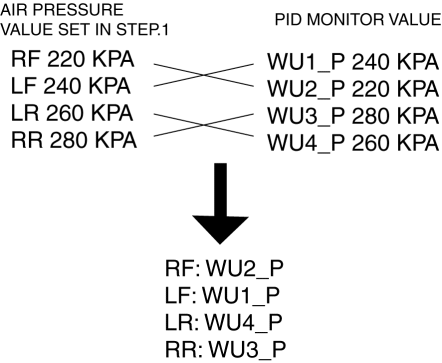
The tire pressure monitoring system (TPMS) does not identify the location of the malfunctioning wheel unit on the vehicle (RF, LF, LR, RR). The TPMS identifies each wheel unit as No.1, No.2, No.3 and No.4. In order to identify the location of the wheel unit, perform the following procedure.
1. Adjust the air pressure as follows:
-
RF: 220 kPa {2.2 kgf/cm2, 32 psi}
-
LF: 240 kPa {2.4 kgf/cm2, 35 psi}
-
LR: 260 kPa {2.6 kgf/cm2, 38 psi}
-
RR: 280 kPa {2.8 kgf/cm2, 40 psi}
2. Switch the ignition to off.
3. Connect the M-MDS to the DLC-2.
4. Switch the ignition to ON.
5. Drive the vehicle at a speed of 25 km/h {15.5 mph} or more
for 2 min or more.
6. Select the following PIDs using the M-MDS, and monitor them.
-
WU1_P
-
WU2_P
-
WU3_P
-
WU4_P
7. Determine which wheel unit identification code matches which wheel and tire by comparing the PID monitor values with the air pressure values set in Step 1.
 Wheels, Tires
...
 Parameter Setting Procedure When Tire Size Is Changed
CAUTION:
If the wheel and tire sizes are changed, a discrepancy with the speedometer
needle whereby it exceeds the allowable range could result in a malfunction.
If the wheel and tire si ...
Other materials:
Oil Seal (Differential) Replacement [C66 M R]
1. Remove the aerodynamic under cover No.2 and the splash shield as a single
unit..
2. Drain the manual transaxle oil..
3. Disconnect the drive shaft (LH) from the MTX..
4. Disconnect the drive shaft (RH) from the joint shaft..
5. Remove the joint shaft..
6. Remove the oil seal (LH).
...
Error Indications (Type A)
If you see an error indication on the
display, find the cause in the chart. If you
cannot clear the error indication, take the
vehicle to an Authorized Mazda Dealer.
Indication
Cause
Solution
CHECK
USB
USB device
malfunction
Verify that the content
...
Filament Repair
1. Clean the filament using isopropyl alcohol.
2. Attach tape to both sides of the filament.
3. Using a small brush or marking pen, apply silver paint.
4. After 2—3 min, carefully remove the tape without damaging the applied
area.
CAUTION:
Do not operate the rear window defro ...
