
Mazda 3 Service Manual: Side Panel Removal/Installation
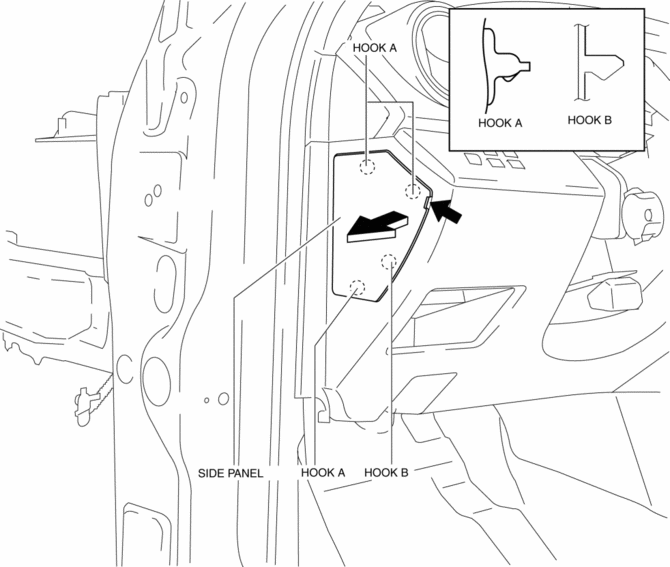
1. Insert a tape-wrapped fastener remover into the position indicated by the arrow in the figure.
2. Pull the side panel in the direction of the arrow shown in the figure, then remove the clips and hook.
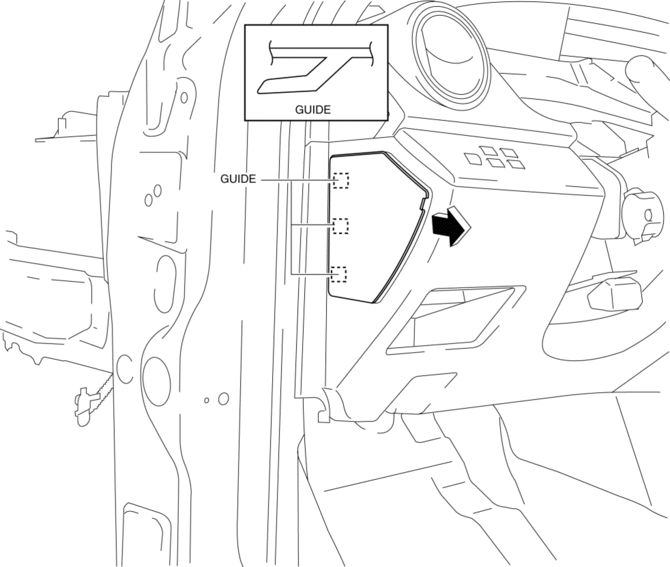
3. Pull the side panel in the direction of the arrow shown in the figure, while detaching the guides.
CAUTION:
-
When pulling out the side panel, be careful not to damage the guide.
4. Install in the reverse order of removal.
 Seal Plate Removal/Installation
1. Disconnect the negative battery cable..
2. Remove the front bumper..
3. Remove the bolt.
4. Pull the seal plate in the direction of arrow shown in the figure, then remove
the hook.
...
 Side Step Molding Installation
NOTE:
Double-sided adhesive tape has already been adhered to a new side step molding
for installation.
When a side step molding is to be reused, perform the following procedure:
1 ...
Other materials:
Theft Deterrent System Clearing Freeze Frame Data
1. Connect the M-MDS (IDS) to the DLC–2.
2. After the vehicle is identified, select the following items from the initialization
screen of the IDS.
Select “Body”.
Select "Burglar Service Functions".
3. Then, select the following item from the screen menu. ...
Brake Fluid Pressure Sensor Inspection
1. Switch the ignition to off.
2. Install the SSTs to the master cylinder (secondary side) as shown in
the figure.
NOTE:
When installing the SST (49 D043 0A0) to the master cylinder, use
a commercially available flare nut wrench (flare nut across flat 12 mm {0.47
in}).
...
Clock
Setting the time
The clock can be set at any time when the
ignition is switched to ACC or ON.
To adjust the time, press the clock
button ( ) for about 2 seconds
until
a beep is heard.
The clock's current time will flash.
Time adjustment
To adjust the time, press the hour/
...
