
Mazda 3 Service Manual: Steering Gear And Linkage Removal/Installation
CAUTION:
-
Performing the following procedures without first removing the ABS wheel-speed sensor may possibly cause an open circuit in the wiring harness if it is pulled by mistake. Before performing the following procedures, disconnect the ABS wheel-speed sensor connector (axle side) and fix the wiring harness to an appropriate place where it will not be pulled by mistake while servicing the vehicle.
-
Secure the steering wheel using tape or a cable to prevent the steering shaft from rotating after disconnecting the steering shaft. If the steering wheel rotates after the steering shaft and the steering gear and linkage are disconnected, the internal parts of the clock spring could be damaged.
1. Remove the joint cover..
2. Disconnect the steering shaft from the steering gear and linkage..
3. Remove the front crossmember component..
4. Remove in the order indicated in the table.
5. Install in the reverse order of removal.
6. After installation, inspect the front wheel alignment and adjust it if necessary..
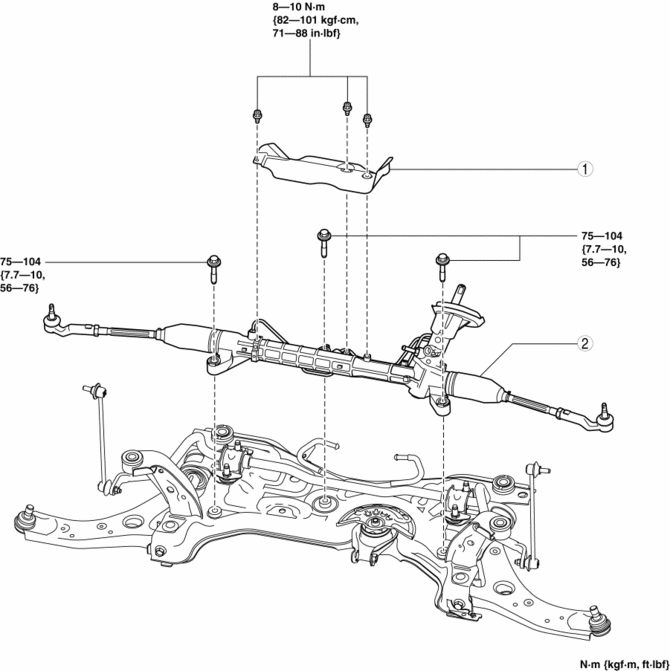
|
1 |
Insulator |
|
2 |
Steering gear and linkage (See Steering Gear and Linkage Removal Note.) |
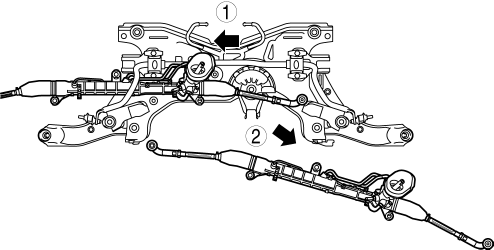
Steering Gear and Linkage Removal Note
1. Remove the steering gear and linkage installation bolts, move the steering gear and linkage in the direction and order of the arrows shown in the figure, and then remove it.
 Steering Gear And Linkage Inspection
Steering Rack Inspection
1. Inspect for cracking, damage, and tooth wear.
If there is any malfunction, replace the steering rack.
2. Measure the steering rack warp.
If it ex ...
 Wheel, Column
...
Other materials:
Tire Rotation
WARNING
Rotate tires periodically:
Irregular tire wear is dangerous. To
equalize tread wear for maintaining
good performance in handling and
braking, rotate the tires every 12,000
km (7,500 miles). However Mazda
recommends to rotate every 8,000 km
(5,000 miles) to help ...
Transaxle Oil Inspection [A26 M R]
1. Park the vehicle on level ground.
2. Remove the aerodynamic under cover No.2..
3. Remove the oil level plug and gasket.
4. Verify that the oil is near the brim of the plug port.
If the oil level is lower than the low level, add the specified amount and
type of oil through the ...
Intake Air System Removal/Installation [Mzr 2.0, Mzr 2.5]
WARNING:
A hot engine and intake air system can cause severe burns. Turn off the engine
and wait until they are cool before removing the intake air system.
Fuel is very flammable liquid. If fuel spills or leaks from the pressurized
fuel system, it will cause serious injury or d ...
