
Mazda 3 Service Manual: Steering Gear And Linkage Inspection
Steering Rack Inspection
1. Inspect for cracking, damage, and tooth wear.
-
If there is any malfunction, replace the steering rack.
2. Measure the steering rack warp.
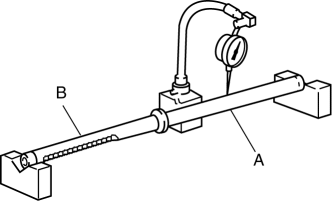
-
If it exceeds the maximum specification, replace the steering rack.
-
Steering rack runout
-
Large diameter portion (near point A): 0.15 mm {0.006 in} max.
-
Small diameter portion (near point B): 0.20 mm {0.008 in} max.
Tie-rod End Inspection
1. Inspect the tie-rod end for damage and the boot for cracks.
-
If there is any malfunction, replace the tie-rod end.
2. Inspect for excessive play.
-
If there is any malfunction, replace the tie-rod end.
3. Rotate the ball joint 5 times
.
4. Install two nuts to the ball joint and measure the tie-rod end rotational torque using a torque wrench.
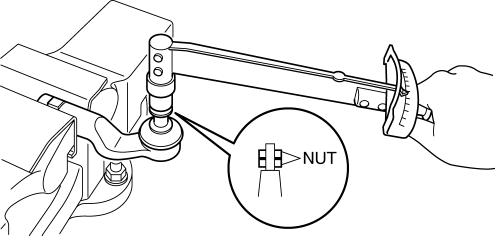
-
If not within the specification, replace the tie-rod end.
-
Tie-rod end rotational torque
-
0.5—3.0 N·m {5.1—30 kgf·cm, 4.5—26 in·lbf}
Tie rod Inspection
1. Inspect for bending and damage.
-
If there is any malfunction, replace the tie rod.
2. Inspect for excessive play.
-
If there is any malfunction, replace the tie rod.
3. Swing the ball joint 10 times
.
4. Measure the ball joint swing torque using a pull scale.
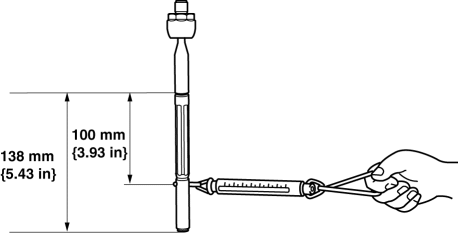
-
If it exceeds the specification, replace the tie rod.
-
Tie rod swing torque
-
0.4—4.0 N·m {4.1—40 kgf·cm, 3.6—35 in·lbf}
-
[Pull scale reading 0.6—29.3 N {0.06—2.98 kgf, 0.14—6.58 lbf}]
 Steering Gear And Linkage Disassembly
CAUTION:
To prevent damage to the steering gear, secure it to the vise using a copper
plate or clean cloth.
1. Disassemble in the order indicated in the table.
1
...
 Steering Gear And Linkage Removal/Installation
CAUTION:
Performing the following procedures without first removing the ABS wheel-speed
sensor may possibly cause an open circuit in the wiring harness if it is pulled
by mistake. Before ...
Other materials:
Air Filter Removal/Installation [Mzr 2.0, Mzr 2.5]
Except for Mexico
1. Remove the fuel-filler pipe protector..
2. Remove in the order indicated in the table.
1
Evaporative hose
2
Air filter
3. Install in the reverse order of removal. ...
Warranties for Your Mazda
New Vehicle Limited Warranty
Powertrain Limited Warranty
Safety Restraint System Limited Warranty
Anti-perforation Limited Warranty
Federal Emission Control Warranty/California Emission Control Warranty
Emission Defect Warranty
Emission Performance Warranty
Emission Control ...
Hood Disassembly/Assembly
Except Mazdaspeed3
1. Disassemble in the order indicated in the table.
1
Weather strip parting seal
2
Weather strip shroud seal
3
Fasteners A
4
Fasteners B
5
...
