
Mazda 3 Service Manual: Steering Wheel And Column Inspection
Play Inspection
1. With the wheels in the straight-ahead position, start the engine.
2. Turn the steering wheel to the left and right gently, then verify that the steering wheel play is within the specification.
-
Steering wheel play
-
0—30 mm {0—1.18 in} (When hydraulic operating)
Looseness, Excessive Play Inspection
1. Inspect the steering wheel for looseness or excessive play in the axial direction of the shaft and four locations around the steering wheel.
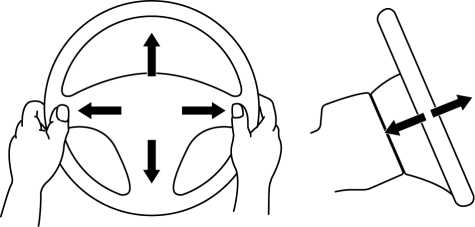
-
If there is any malfunction, inspect the following, and repair or replace the applicable part.
-
Column bearing wear
-
Looseness of the steering wheel installation part
-
Looseness of the column installation area
-
Excessive play of the steering shaft joint
-
Excessive play of the steering gear
Steering Force Inspection
1. Verify that the equipped tire size and tire air pressure is as specified.
2. With the vehicle on a hard, level surface, put the wheels in the straight-ahead position.
WARNING:
-
Handling the air bag module improperly can accidentally operate (deploy) the air bag module, which may seriously injure you. Read the service warnings before handling the air bag module..
3. Remove the air bag module..
4. Start the engine and idle it.
5. Verify that the EHPAS warning light does not illuminate.
6. Inspect the steering force using a torque wrench.
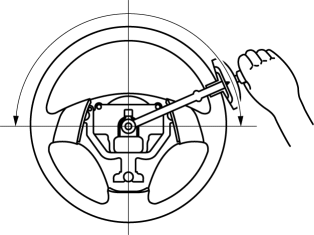
-
If not within the specification, verify the following:
-
No air in steering system
-
No fluid leakage at hose or connectors
-
Function of oil pump and steering gear
-
Steering wheel force (reference value)
-
7.8 N·m {80 kgf·cm, 69 in·lbf} or less
NOTE:
-
Comparing another vehicle of the same model under the same conditions is an acceptable inspection method.
-
The steering force varies with conditions indicated below.
-
Road conditions: Such as dry, wet, asphalt, or concrete
-
Tire condition: such as brand, wear, and tire pressure
 Steering Shaft Inspection
1. Inspect the column bearing for excessive play and damage.
2. Verify that the measurement of the steering shaft indicated in the figure
is as specified.
If not within the specificati ...
 Steering Wheel And Column Removal/Installation [With Advanced Keyless Entry
And Push Button Start System]
Steering Wheel And Column Removal/Installation [With Advanced Keyless Entry
And Push Button Start System]
WARNING:
Handling the air bag module improperly can accidentally operate (deploy)
the air bag module, which may seriously injure you. Read the service warnings
before handling the air ba ...
Other materials:
Windshield Wipers
Turn the wipers on by pressing the lever
up or down.
With intermittent wiper
Variable-speed intermittent wipers
Set the lever to the intermittent position
and choose the interval timing by rotating
the ring.
With auto-wiper control
Auto-wiper control
When the wiper lever is ...
Automatic Transaxle Fluid (ATF) Replacement [Fw6 A EL]
WARNING:
Do not perform the servicing while the ATF is hot. Otherwise, it could cause
severe burns or serious injury.
1. Remove aerodynamic undercover No.2..
2. Remove the dipstick securing bolt.
3. Remove the dipstick.
4. Remove the drain plug and washer, and drain the AT ...
Timing Chain Removal/Installation [Mzr 2.3 Disi Turbo]
WARNING:
Fuel vapor is hazardous. It can very easily ignite, causing serious injury
and damage. Always keep sparks and flames away from fuel.
Fuel line spills and leakage are dangerous. Fuel can ignite and cause serious
injuries or death and damage. Fuel can also irritate skin ...
