
Mazda 3 Service Manual: Valve Clearance Inspection [Mzr 2.0, Mzr 2.5]
1. Remove the battery cover..
2. Disconnect the negative battery cable..
3. Remove the plug hole plate..
4. Disconnect the wiring harness.
5. Remove the ignition coils..
6. Remove the spark plugs..
7. Remove the ventilation hose.
8. Remove the oil level gauge.
9. Remove the cylinder head cover..
10. Remove the aerodynamic under cover No.2 and splash shield as a single unit..
11. Measure the valve clearance.
NOTE:
-
Make sure to note down the measured values for choosing the suitable replacement tappets.
a. Turn the crankshaft clockwise so that the No.1 piston is at top dead center (TDC) of the compression stroke.
b. Measure the valve clearance at A in the figure.
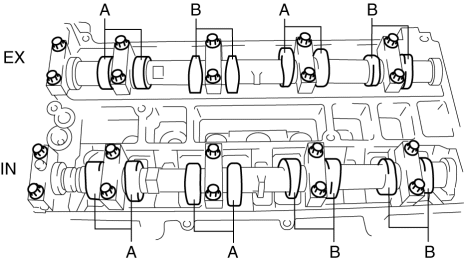
-
Valve clearance for inspection [Engine cold]
-
IN: 0.22—0.30 mm {0.009—0.011 in}
-
EX: 0.27—0.37 mm {0.011—0.014 in}
c. If the valve clearance is out of the standard value, adjust it..
d. Turn the crankshaft 360°
clockwise so that the No.4 piston is at TDC of the compression stroke.
e. Measure the valve clearance at B in the figure.
-
Valve clearance for inspection [Engine cold]
-
IN: 0.22—0.30 mm {0.009—0.011 in}
-
EX: 0.27—0.37 mm {0.011—0.014 in}
f. If the valve clearance is out of the standard value, adjust it..
12. Install in the reverse order of removal.
 Valve Clearance Adjustment [Mzr 2.0, Mzr 2.5]
1. Remove the battery cover..
2. Disconnect the negative battery cable.
3. Remove the plug hole plate..
4. Disconnect the wiring harness.
5. Remove the ignition coils..
6. Remove the spark p ...

Other materials:
Drive Selection
Drive selection is a system to switch the vehicle's drive mode. When the
sport mode
is selected, vehicle's response against accelerator operation is enhanced. This
provides
additional quick acceleration which may be needed to safely make maneuvers such
as lane
changes, merging onto freeways ...
Precaution [ABS]
1. Any one or a combination of the ABS warning and brake system warning lights
illuminates even when the system is normal.
Warning lights that may illuminate and/or flash
Cases in which the light may illuminate
Conditions in which the light will go ou ...
Antenna Feeder No.4 Inspection
1. Disconnect the negative battery cable..
2. Remove the following parts:
a. Upper column cover.
b. Instrument cluster.
c. Center panel.
d. Audio unit (Vehicles with audio unit).
e. Center cover.
f. Dashboard upper panel.
g. Front scuff plate (RH).
h. Front side trim (RH).
3. Dis ...
