
Mazda 3 Service Manual: High Mount Brake Light Bulb Removal/Installation
4SD
1. Disconnect the negative battery cable..
2. Remove the trunk lid trim..
3. Remove in the order indicated in the table.
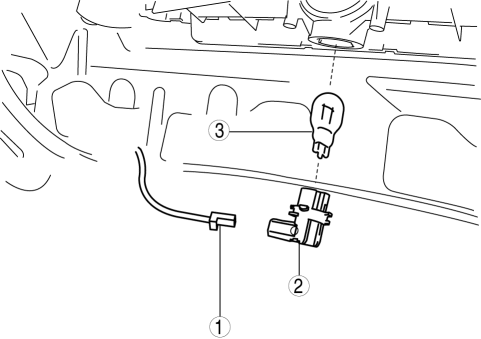
|
1 |
Connector |
|
2 |
Socket |
|
3 |
High-mount brake light bulb |
4. Install in the reverse order of removal.
5HB
1. Disconnect the negative battery cable..
2. Remove the liftgate upper trim..
3. Remove the high-mount brake light..
4. Remove in the order indicated in the table.
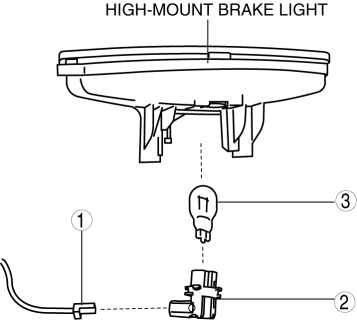
|
1 |
Connector |
|
2 |
Socket |
|
3 |
High-mount brake light bulb |
5. Install in the reverse order of removal.
 Headlight Leveling Actuator Inspection
NOTE:
Headlight leveling actuator are integrated with the front combination light.
For the actuator inspection of the headlight auto leveling system, perform
the headlight leveling ...
 High Mount Brake Light Disassembly/Assembly
4SD
1. Disconnect the negative battery cable..
2. Remove the trunk lid trim..
3. Remove the high-mount brake light..
4. Remove the high-mount brake light outer lens.
5. Remove the high-mo ...
Other materials:
After Service Precaution [Mzr 2.0, Mzr 2.5]
WARNING:
Fuel line spills and leakage are dangerous. Fuel can ignite and cause serious
injuries or death and damage. When installing the fuel hose, perform “Fuel Leakage
Inspection” described below.
A person charged with static electricity could cause a fire or explosion,
...
Transaxle Oil Replacement [G35 M R]
1. Park the vehicle on level ground.
2. Remove the aerodynamic under cover No.2..
3. Remove the drain plug and washer.
4. Drain the oil into a suitable container.
5. Install a new washer and the drain plug.
Tightening torque
39—59 N·m {4.0—6.0 kgf·m, 29—43 ft·lbf}
...
Fan Switch Inspection [Manual Air Conditioner]
1. Disconnect the negative battery cable..
2. Remove the following parts:
a. Upper panel.
b. Shift lever knob (MTX).
c. Selector lever knob (ATX).
d. Shift panel.
e. Side wall.
f. Console.
g. Front scuff plate.
h. Front side trim.
i. Dashboard under cover.
j. Glove compartment. ...
