
Mazda 3 Service Manual: Auto Leveling Sensor Inspection
1. Disconnect the negative battery cable..
2. Remove the auto leveling sensor..
3. Connect the three dry cell batteries (1.5 V) in a series.
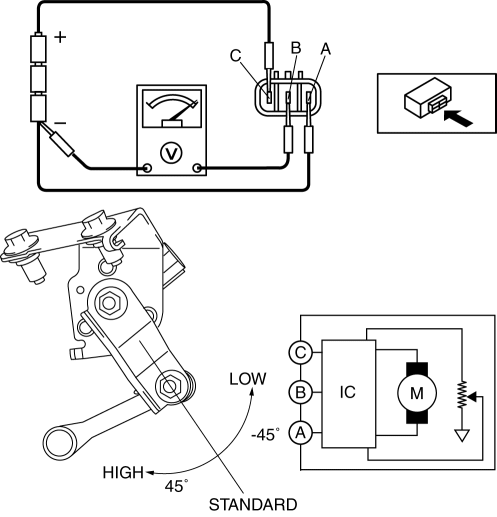
4. Connect auto leveling sensor terminal A to the battery’s minus terminal, and terminal C to the battery’s plus terminal, and apply 4.5 V of voltage between terminals A and C.
5. Connect the tester as shown in the figure.
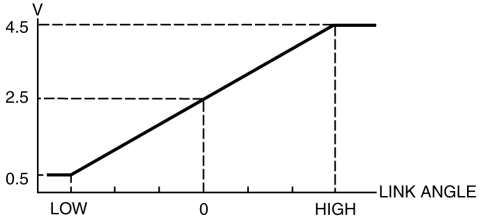
6. When slowly moving the link up and down, verify that the shift is linear while the voltage is 0.5 to 4.5 V.
-
If the voltage cannot be verified as indicated in the graph, replace the auto leveling sensor.
 General
...
 Auto Leveling Sensor Removal/Installation
1. Disconnect the negative battery cable..
2. Lift up the vehicle.
3. Disconnect the quick release connector. (charcoal canister side).
4. Remove in the order indicated in the table.
...
Other materials:
Front Tilt Motor Inspection
1. Remove the battery cover..
2. Disconnect the negative battery cable and wait 1 min or more..
3. Disconnect the front tilt motor connector.
4. Apply battery positive voltage to the front tilt motor terminals and inspect
the front tilt motor operation
If not as specified, replac ...
Thermostat Removal/Installation [Mzr 2.0, Mzr 2.5]
WARNING:
Never remove the cooling system cap or loosen the radiator drain plug while
the engine is running, or when the engine and radiator are hot. Scalding engine
coolant and steam may shoot out and cause serious injury. It may also damage
the engine and cooling system.
Tu ...
Headlight Bulb Removal/Installation
Halogen Type
Low-beam
1. Disconnect the negative battery cable..
2. Disconnect the connector.
3. Remove the cover.
4. Remove the adaptor.
5. Remove the headlight bulb (LO).
CAUTION:
A halogen bulb generates extremely high heat when it is illuminated. If the
surface of ...
