
Mazda 3 Service Manual: Auto Leveling Sensor Removal/Installation
1. Disconnect the negative battery cable..
2. Lift up the vehicle.
3. Disconnect the quick release connector. (charcoal canister side).
4. Remove in the order indicated in the table.
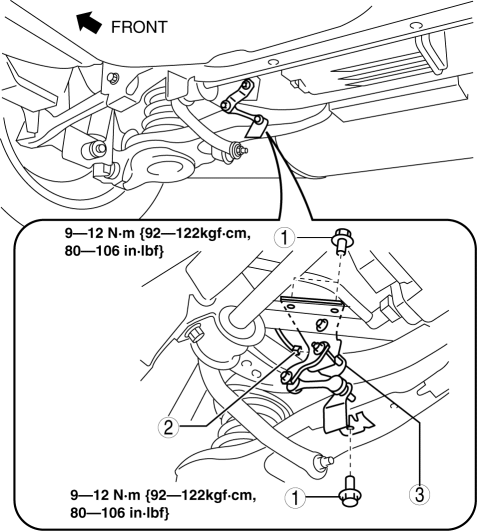
|
1 |
Bolt |
|
2 |
Connector |
|
3 |
Auto leveling sensor |
5. Install in the reverse order of removal.
6. Perform the headlight auto leveling system initialization..
 Auto Leveling Sensor Inspection
1. Disconnect the negative battery cable..
2. Remove the auto leveling sensor..
3. Connect the three dry cell batteries (1.5 V) in a series.
4. Connect auto leveling sensor terminal A to the ...
 Cargo Compartment Light Bulb Removal/Installation
1. Disconnect the negative battery cable..
2. Remove the cargo compartment light..
3. Remove the cargo compartment light bulb.
4. Install in the reverse order of removal. ...
Other materials:
Charging equipment
Charging equipment and names
AC charging inlet
Charging indicator and charging inlet light
DC charging inlet
Charging port lid
AC charging cable (if equipped)*
Charging port
*: For safe handling procedures and precautions related to the AC charging cable,
always refer to the ...
Antilock Brake System (ABS)
The ABS control unit continuously
monitors the speed of each wheel. If
one wheel is about to lock up, the ABS
responds by automatically releasing and
reapplying that wheel's brake.
The driver will feel a slight vibration in
the brake pedal and may hear a chattering
noise from the brake syst ...
Combination Switch Disassembly/Assembly
CAUTION:
Handling the air bag module improperly can accidentally deploy the air bag
module, which may seriously injure you. Read the air bag system service warnings
and cautions before handling the air bag module..
1. Switch the ignition to off.
2. Disconnect the negative batte ...
