
Mazda 3 Owners Manual: Brake/Clutch Fluid
Inspecting Brake/Clutch Fluid Level
| WARNING
If the brake/clutch fl uid level is low, have
the brakes inspected:
A low brake/clutch fl uid level is
dangerous. A low level could indicate brake lining wear or a brake system leak which could cause the brakes to fail and lead to an accident. |
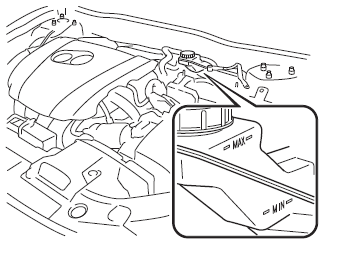
The brakes and clutch draw fluid from the same reservoir.
Inspect the fluid level in the reservoir regularly. It should be kept between the MAX and MIN lines.
The level normally drops with accumulated distance, a condition associated with wear of brake and clutch linings. If it is excessively low, have the brake/clutch system inspected by an Authorized Mazda Dealer.
 Engine Coolant
Inspecting Coolant Level
WARNING
Do not use a match or live fl ame in the
engine compartment. DO NOT ADD
COOLANT WHEN THE ENGINE IS HOT:
A hot engine is dangerous. If the
engine ...
 Washer Fluid
Inspecting Washer Fluid Level
WARNING
Use only windshield washer fl uid or
plain water in the reservoir:
Using radiator antifreeze as washer
fl uid is dangerous. If sprayed on the
...
Other materials:
Crankshaft Position (CKP) Sensor Removal/Installation [Mzr 2.0, Mzr 2.5]
Removal
CAUTION:
When foreign material such as an iron chip is on the CKP sensor, it can cause
abnormal output from the sensor because of flux turbulence and adversely affect
the engine control. Be sure there is no foreign material on the CKP sensor when
replacing.
Do not a ...
Rear Brake (Disc) Inspection
Brake Judder Repair Hints
Description
1. Brake judder concern has the following 3 characteristics:
Steering wheel vibration
1. The steering wheel vibrates in the rotation direction. This characteristic
is most noticeable when applying brakes at a vehicle speed of 100—140 km/h {62.2—86.9
...
Starter Inspection [Mzr 2.0, Mzr 2.5]
On-vehicle Inspection
1. Verify that the battery is fully charged.
2. The starter is normal if it rotates smoothly and without any noise when the
engine is cranked.
If the starter does not operate, inspect the following:
Remove the starter, and inspect the starter unit.
...
