
Mazda 3 Service Manual: Dashboard Removal/Installation
1. Set the air intake mode to FRESH.
2. Set the air mix mode to MAX COLD.
3. Disconnect the negative battery cable..
4. Remove the following parts:
a. Front doors.
b. Front scuff plate.
c. Front side trim.
d. Dashboard under cover.
e. Glove compartment.
f. Upper panel.
g. Shift lever knob (MTX).
h. Selector lever knob (ATX).
i. Shift panel.
j. Side wall.
k. Console.
l. Shift lever component (MTX).
m. Selector lever component (ATX).
n. Hood release lever.
o. Lower panel.
p. Knee bolster.
q. Driver-side air bag module.
r. Steering wheel.
s. Column cover.
t. Combination switch.
u. Joint cover.
v. Steering shaft.
w. Center panel.
x. Audio unit.
y. Climate control unit.
z. Instrument cluster.
aa. Center cover.
ab. Dashboard upper panel.
ac. Hole cover.
ad. Information display.
ae. A-pillar trim.
af. Windshield wiper arm and blade.
ag. Front fender molding.
ah. Cowl grille.
ai. Windshield wiper motor.
5. Disconnect The blower motor connector..
6. Disconnect the dashboard harness connectors.
7. Remove the shower duct..
8. Remove the heater case..
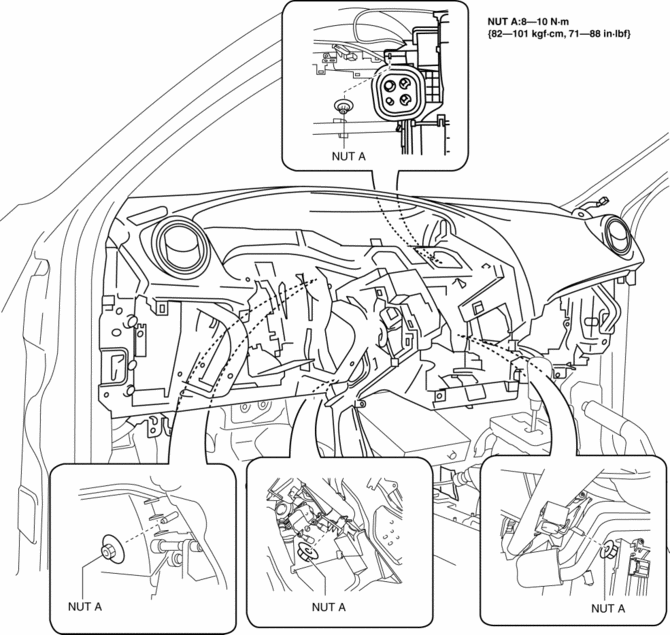
9. Remove the nuts A.
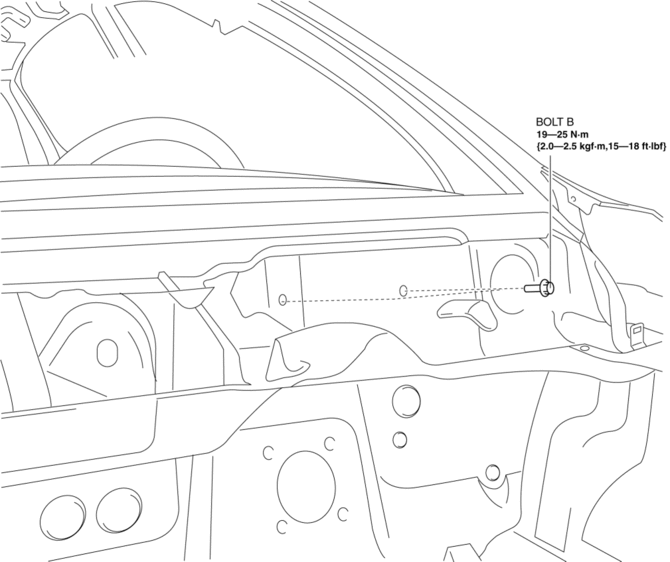
10. Remove the bolts B.
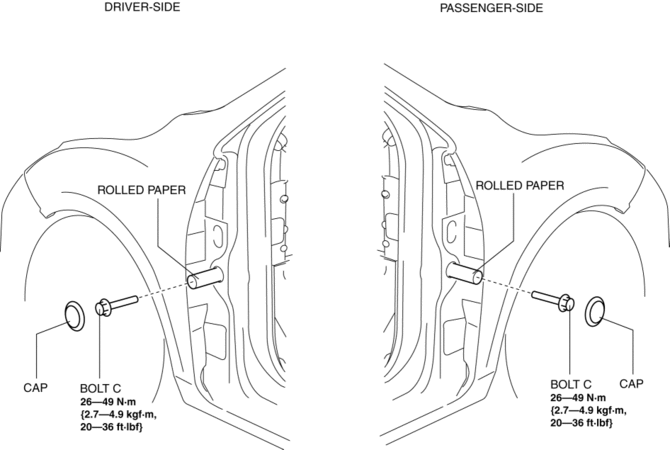
11. Remove the caps then set the rolled paper.
12. Remove the bolts C.
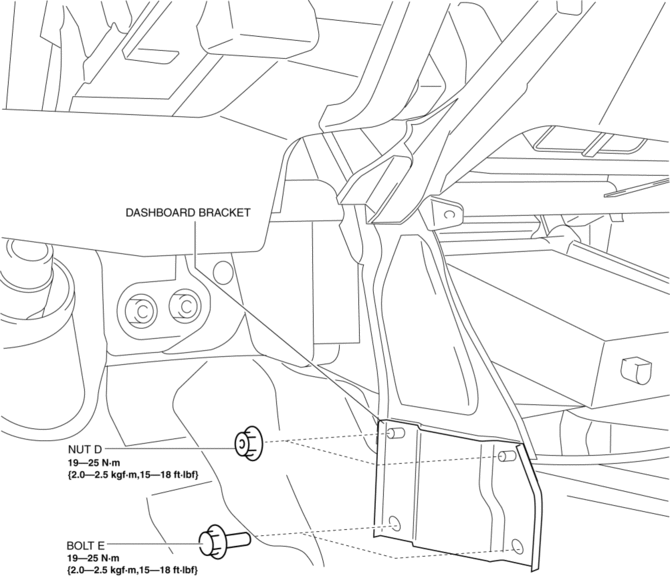
13. Remove the nuts D and bolts E then remove the dashboard bracket.
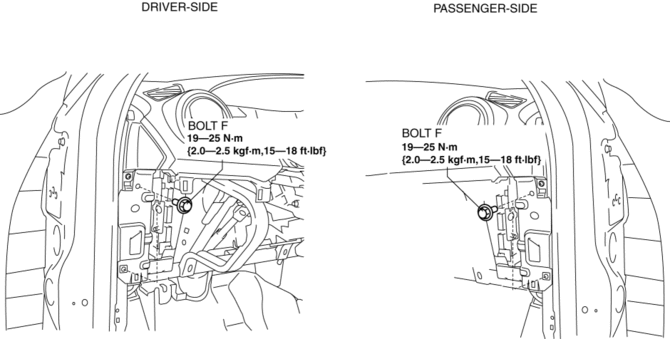
14. Remove the bolts F..
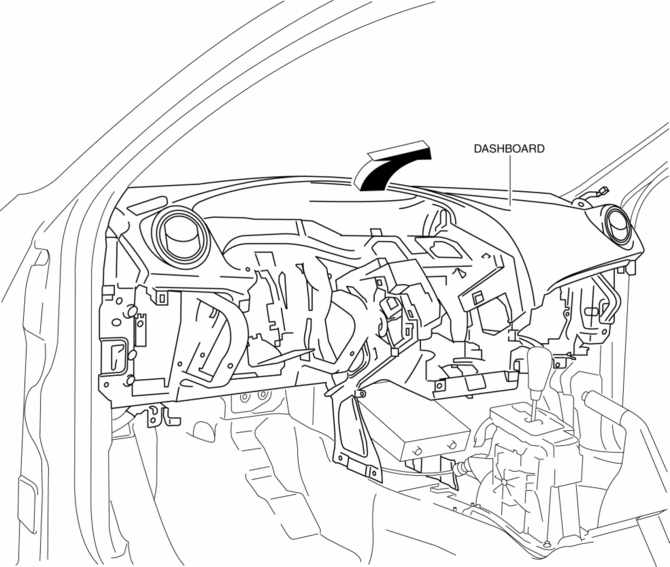
15. Raise the back side of the dashboard rotate it in the direction of the arrow shown in the figure.
WARNING:
-
Removing the dashboard without supporting it can be dangerous. The dashboard may fall and injure you. Always perform the following procedure with at least another person.
16. Remove the dashboard.
17. Take the dashboard off from the front driver-side door opening.
18. Install in the reverse order of removal.
Bolt F Installation Note
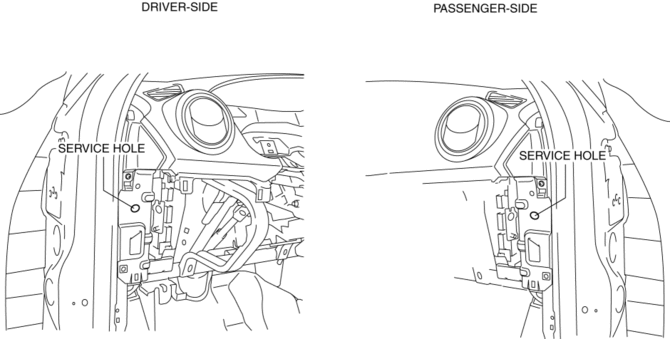
1. Fit the service hole of dashboard and hinge pillar inner shown in the figure.
2. Partially tighten the bolts F in the order (1), (2), (3), (4) shown in the figure.
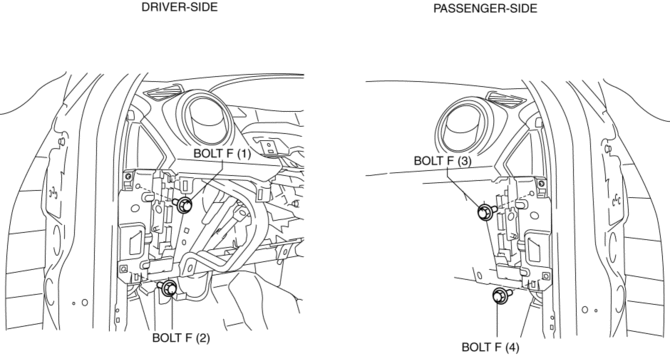
3. Reconfirms fit the service hole of dashboard and hinge pillar inner, then tighten the upper side bolt F.
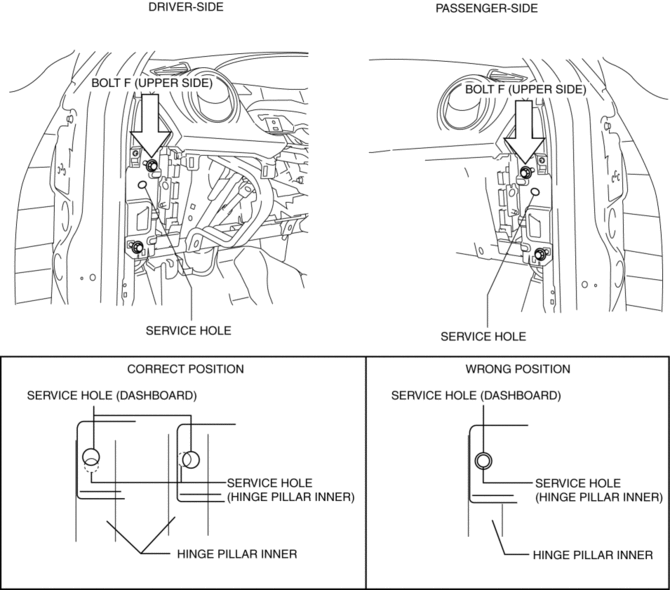
4. Tighten the all of bolts F.
 Dashboard Disassembly/Assembly
1. Remove the ventilator grilles..
2. Remove the Passenger-side air bag module..
3. Disassemble in the order indicated in the table.
4. Assemble in the reverse order of disassembly.
...
 Dashboard Under Cover Removal/Installation
1. Detach the hooks in the direction of arrow (1) shown in the figure.
2. Pull the dashboard under cover in the direction of arrow (2).
3. Remove the dashboard under cover, then remove the gui ...
Other materials:
SRS airbags
The SRS airbag system in the Subaru Solterra is engineered to deploy
during specific types of severe impacts that may otherwise cause serious harm to
vehicle occupants. These advanced airbags function in combination with seat belts
to significantly reduce the risk of fatal or severe injuries.
...
Drive Belt Auto Tensioner Inspection [Skyactiv G 2.0]
WARNING:
A hot engine can cause severe burns. Turn off the engine and wait until it
is cool before servicing.
CAUTION:
If the rubber part of the drive belt auto tensioner is damaged by a screwdriver
or other tool, oil in the hydraulic pressure unit could leak and the tens ...
Oil Control Valve (OCV) Inspection [Skyactiv G 2.0]
Coil Resistance Inspection
1. Remove the battery cover..
2. Disconnect the negative battery cable..
3. Remove the plug hole plate..
4. Disconnect the OCV connector.
5. Measure the resistance between terminals A and B using an ohmmeter.
OCV coil resistance
6.9—7.5 ohms [20°C ...
