
Mazda 3 Service Manual: Dashboard Under Cover Removal/Installation
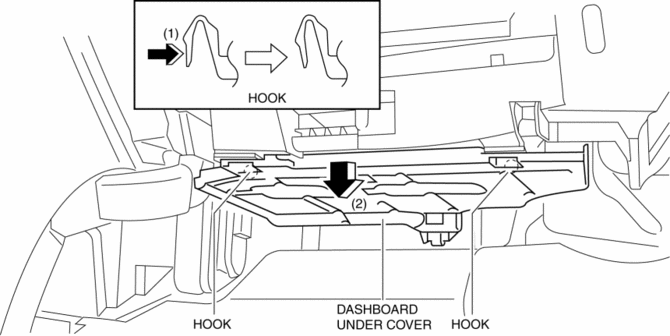
1. Detach the hooks in the direction of arrow (1) shown in the figure.
2. Pull the dashboard under cover in the direction of arrow (2).
3. Remove the dashboard under cover, then remove the guide.
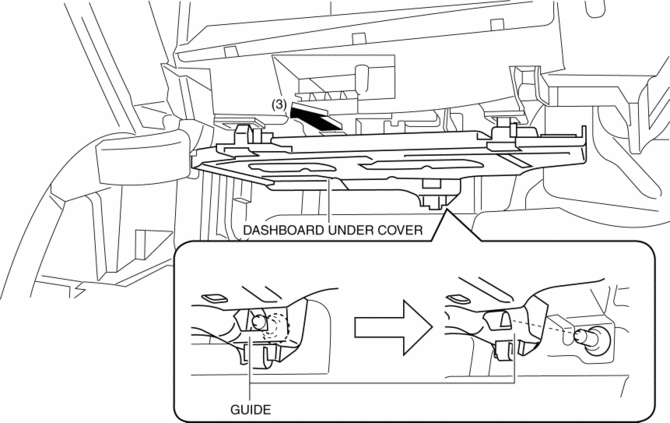
4. Install in the reverse order of removal.
 Dashboard Removal/Installation
1. Set the air intake mode to FRESH.
2. Set the air mix mode to MAX COLD.
3. Disconnect the negative battery cable..
4. Remove the following parts:
a. Front doors.
b. Front scuff plate.
c. ...
 Dashboard Upper Panel Removal/Installation
Vehicles Without Bose®
1. Disconnect the negative battery cable..
2. Remove the following parts:
a. Upper column cover.
b. Instrument cluster.
c. Center panel.
d. Center cover.
3. Remove ...
Other materials:
Splash Shield Removal/Installation
Front Splash Shield
1. Remove the bolts and fastener then remove the front splash shield.
2. Install in the reverse order of removal.
Rear Splash Shield
1. Remove the fastener, screws and capnut .
2. Pull the rear splash shield in the direction of the arrow shown in the figure,
the ...
Wheel Hub Component Removal/Installation
CAUTION:
Performing the following procedures without first removing the ABS wheel-speed
sensor may possibly cause an open circuit in the wiring harness if it is pulled
by mistake. Before performing the following procedures, disconnect the ABS wheel-speed
sensor connector (axle side) ...
LCA (Lane Change Assist)
LCA functions
In the Subaru Solterra, the Lane Change Assist (LCA) system works in conjunction
with Lane Tracing Assist (LTA) to support smoother and more controlled lane changes.
By applying subtle steering inputs, the Subaru Solterra helps guide the vehicle
into the adjacent lane when condi ...
