
Mazda 3 Service Manual: Back Up Light Switch Removal/Installation [G35 M R]
1. Remove the battery cover..
2. Disconnect the negative battery cable.
3. Remove the battery component. (ex: battery, battery tray and PCM component).
4. Remove the aerodynamic under cover No.2..
5. Drain the oil from the transaxle..
6. Disconnect the back-up light switch connector and remove the back-up light switch.
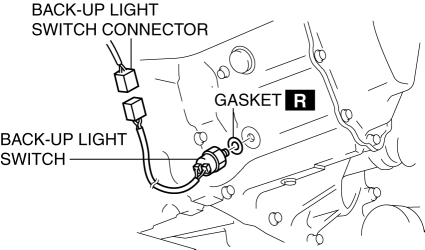
7. Install the back-up light switch (with a new gasket) to the transaxle case.
-
Tightening torque
-
20—29 N·m {2.1—2.9 kgf·m, 15—21 ft·lbf}
8. Install the battery component. (ex: battery, battery tray and PCM component)(See BATTERY REMOVAL/INSTALLATION [MZR 2.0, MZR 2.5].)
9. Install the battery cover..
10. Add the specified amount and type of oil..
11. Install the aerodynamic under cover No.2..
 Back Up Light Switch Removal/Installation [C66 M R]
1. Remove the battery cover..
2. Disconnect the negative battery cable..
3. Remove the aerodynamic under cover No.2..
4. Remove in the order indicated in the table.
5. Install in the reverse o ...
 Back Up Light Switch Removal/Installation [G66 M R]
1. Remove the battery cover..
2. Disconnect the negative battery cable.
3. Remove the battery component. (ex: battery, battery tray and PCM component).
4. Remove the aerodynamic under cover No. ...
Other materials:
Replacing a Tire
WARNING
Always use tires that are in good condition:
Driving with worn tires is dangerous. Reduced braking, steering, and
traction could result
in an accident.
If a tire wears evenly, a wear indicator will appear as a solid band across
the tread.
Replace the tire when ...
Information Display Removal/Installation
CAUTION:
When replacing the information display, the configuration procedure must
be performed before removing the information display. The information display
will not operate normally if it is replaced without performing the configuration
procedure.
1. Perform the informatio ...
Keys
Key types
The Subaru Solterra is supplied with a set of advanced keys designed to ensure
convenience, security, and seamless interaction with the vehicle’s smart systems.
Electronic keys
Enable operation of the Subaru Solterra smart key system for keyless
entry and start
All ...
