
Mazda 3 Service Manual: Drive Belt Inspection [Skyactiv G 2.0]
Generator Drive Belt
NOTE:
-
The generator drive belt deflection/tension inspection is not necessary with the adoption of the drive belt auto tensioner.
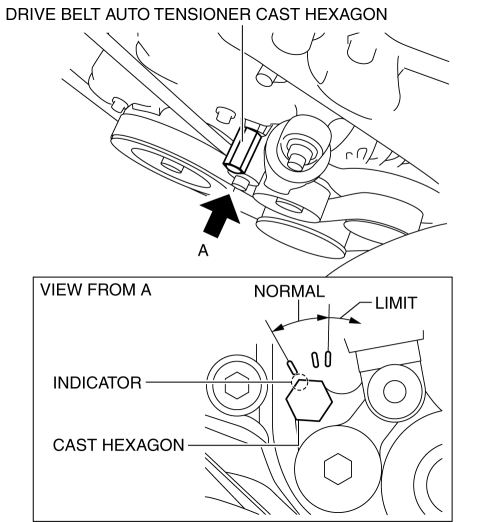
1. Verify that the indicator part of the cast hexagon on the drive belt auto tensioner is within the normal range.
-
If it exceeds the limit, replace the drive belt..
Water Pump Drive Belt
NOTE:
-
The water pump drive belt deflection/tension inspection is not necessary with the adoption of the stretch-type water pump drive belt.
1. Visually inspect or feel that there is no wear, damage, or cracking on the inside and sides of the entire the belt.
-
Even if there is a little wear, damage, or cracking, replace the water pump drive belt..
2. Start the engine to verify that abnormal noise does not occur.
-
If abnormal noise occurs, replace the water pump drive belt..
 Drive Belt Inspection [Mzr 2.3 Disi Turbo]
NOTE:
Drive belt deflection/tension inspection is not necessary because of the
use of the drive belt auto tensioner.
1. Verify that the drive belt auto tensioner indicator mark does n ...
 Drive Belt Removal/Installation [Mzr 2.0, Mzr 2.5]
MZR 2.0
A/C drive belt removal
1. Remove the aerodynamic under cover No.2 and splash shield as a single unit..
2. Remove the nut shown in the figure and set the power steering pipe component
ou ...
Other materials:
A/C Compressor Removal/Installation
1. Disconnect the negative battery cable..
2. Discharge the refrigerant..
3. Remove the aerodynamic under cover No.2..
4. Remove the drive belt..
5. Remove the water hose bracket.
CAUTION:
If moisture or foreign material enters the refrigeration cycle, cooling ability
will b ...
Timing Chain Removal/Installation [Skyactiv G 2.0]
WARNING:
A hot engine can cause severe burns. Turn off the engine and wait until it
is cool before servicing.
CAUTION:
If the camshaft is rotated with the timing chain removed and the piston at
the top dead center position, the valve may contact the piston and the engine ...
Bluetooth ® Preparation (Type B)
Device pairing
To use Bluetooth ® audio and Hands-Free,
the device equipped with Bluetooth ® has
to be paired to the unit using the following
procedure. A maximum of seven devices
including Bluetooth ® audio devices and
hands-free mobile phones can be paired.
NOTE
The Bluetooth ® system ...
