
Mazda 3 Owners Manual: Driving on Uneven Road
Your vehicle's suspension and underbody can be damaged if driven on rough/uneven roads or over speed bumps at excessive speeds. Use care and reduce speed when traveling on rough/uneven roads or over speed bumps.
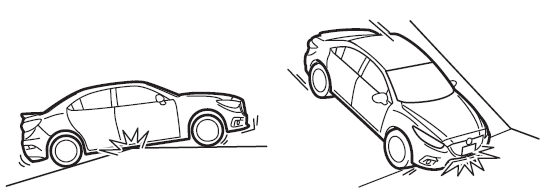
Use care not to damage the vehicle's underbody, bumpers or muffler(s) when driving under the following conditions:
- Ascending or descending a slope with a sharp transition angle
- Ascending or descending a driveway or trailer ramp with a sharp transition angle
This vehicle is equipped with low profile tires allowing class-leading performance and handling. As a result, the sidewall of the tires are very thin and the tires and wheels can be damaged if driven through potholes or on rough/uneven roads at excessive speeds. Use care and reduce speed when traveling on rough/uneven roads or through potholes.
 Overloading
WARNING
Be careful not to overload your vehicle:
The gross axle weight rating (GAWR)
and the gross vehicle weight rating
(GVWR) of the vehicle are on the
Motor Vehicle Safety Sta ...
 Towing
Trailer Towing
Your Mazda is not designed for towing.
Never tow a trailer with your Mazda.
Recreational Towing
An example of "recreational towing" is
towing your vehicle behind a mot ...
Other materials:
Head Restraints
Your vehicle is equipped with head
restraints on all outboard seats and the
rear center seat * . The head restraints
are intended to help protect you and the
passengers from neck injury.
WARNING
Always drive with the head restraints
installed when seats are being used and
make s ...
Smart key system
In the Subaru Solterra, a wide range of vehicle operations can be
performed effortlessly simply by carrying the electronic key on your person, such
as in a pocket or bag. For optimal functionality and security, the driver should
always keep the electronic key within reach.
Locking and unlo ...
Commander switch operation
NOTE
For safety reasons, some operations are disabled while the vehicle is being
driven.
Volume dial operation
Press the volume dial to switch the audio MUTE on and off.
Turn the volume dial to adjust the volume. The volume increases by turning the
dial
clockwise, and decreases by tur ...
