
Mazda 3 Service Manual: Map Light Inspection
1. Disconnect the negative battery cable..
2. Remove the map light..
3. Verify that the continuity between the map light terminals is as indicated in the table.
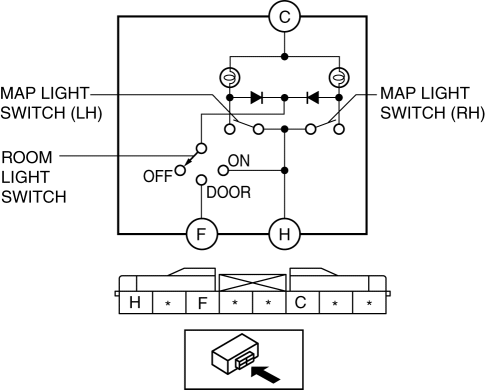
-
If not as indicated in the table, inspect the bulb. If there is no malfunction, replace the map light.
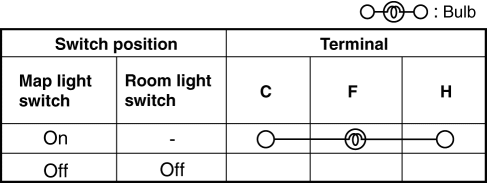
4. Apply battery positive voltage to map light terminal C, and connect terminal F to ground.
5. Switch the interior light switch to the DOOR position and verify that the map light illuminates.
-
If the light does not illuminate, replace the map light.
 Map Light Bulb Removal/Installation
1. Disconnect the negative battery cable..
2. Insert a tape-wrapped fastener remover into the service hole and pry with
the screwdriver in the direction shown by the arrow to remove the lens.
...
 Map Light Removal/Installation
1. Disconnect the negative battery cable..
2. Remove the tabs shown in the figure.
3. Pull the map light in the direction of the arrow (1) shown in the figure and
remove the map light while ...
Other materials:
Immobilizer System
The immobilizer system allows the
engine to start only with a key the system
recognizes.
If someone attempts to start the engine
with an unrecognized key, the engine
will not start, thereby helping to prevent
vehicle theft.
If you have a problem with the
immobilizer system or the key, co ...
Joint Shaft Assembly [Mzr 2.3 Disi Turbo]
1. Assemble in the order indicated in the table.
1
Bracket
2
Dust seal (RH)
.
3
Bearing
.
4
Dust seal (LH)
.
5
Joint shaft
.
Dust Seal ...
Trunk Lid Opener Cable Removal/Installation
1. Disconnect the negative battery cable..
2. Remove the following parts:
a. Front seat (LH)(See FRONT SEAT REMOVAL/INSTALLATION.)
b. Front scuff plate (LH).
c. Rear scuff plate.
d. B-pillar lower trim.
e. Rear seat cushion.
f. Rear seat back.
g. Tire house trim (LH).
h. Trunk end ...
