
Mazda 3 Service Manual: DSC Off Switch Inspection
1. Remove the DSC OFF switch..
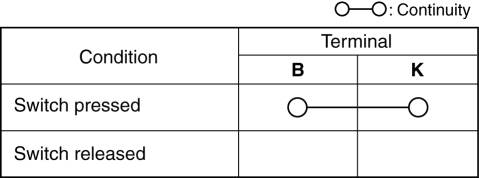
2. Verify that the continuity between the DSC OFF switch terminals is as indicated in the table.
-
If not as indicated in the table, replace the DSC OFF switch.
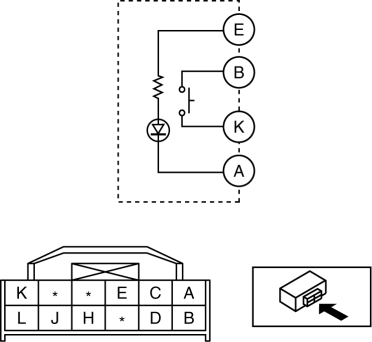
3. Apply battery voltage to DSC OFF switch terminal E, and connect terminal A to ground.
4. Verify that the LED illuminates.
-
If there is any malfunction, replace the DSC OFF switch.
 DSC HU/CM Removal/Installation
WARNING:
If the DSC HU/CM configuration is not completed, it could result in an unexpected
accident due to the DSC being inoperative. If the DSC HU/CM is replaced, always
use the automat ...
 DSC Off Switch Removal/Installation
1. Remove the switch panel in the direction of the arrow shown in the figure.
2. Disconnect the connector.
3. Remove the DSC OFF switch in the direction of the arrow (2) shown in the figure
...
Other materials:
Shift position
Choose the appropriate shift position in your Subaru Solterra according
to your driving needs, road conditions, and intended operation.
Shift position purpose and functions
In the Subaru Solterra, the shift system is designed to deliver smooth, intuitive
control while maximizing safety a ...
Brake Hold
In the Subaru Solterra, the brake hold system is engineered to maintain
braking force automatically when the vehicle is stopped with the shift position
in D or N and the system is activated. Once the brake pedal is used to bring the
Subaru Solterra to a stop, the system keeps the brakes applie ...
Transmitter
NOTE
(With theft-deterrent system)
The hazard warning lights flash when
the theft-deterrent system is armed or
turned off.
Refer to Theft-Deterrent System on .
(With the advanced keyless function)
A beep sound can be heard for
confirmation when the doors and the
l ...
