
Mazda 3 Service Manual: DSC Off Switch Removal/Installation
1. Remove the switch panel in the direction of the arrow shown in the figure.
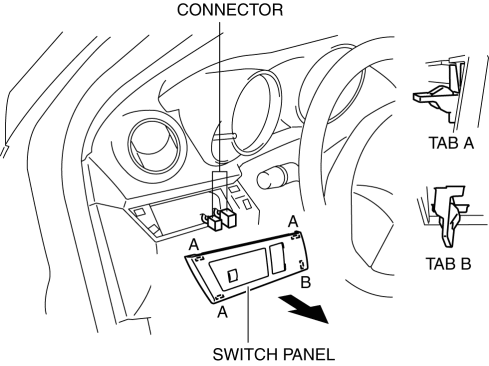
2. Disconnect the connector.
3. Remove the DSC OFF switch in the direction of the arrow (2) shown in the figure while pressing the tabs in the direction of the arrow (1).
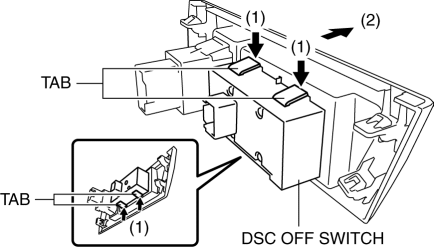
4. Remove the DSC OFF switch.
5. Install in the reverse order of removal.
 DSC Off Switch Inspection
1. Remove the DSC OFF switch..
2. Verify that the continuity between the DSC OFF switch terminals is as indicated
in the table.
If not as indicated in the table, replace the DSC OFF switch ...
 DSC Sensor Initialization Procedure
WARNING:
If the DSC sensor initialization procedure is not completed, the DSC will
not operate properly and it might cause an unexpected accident. Therefore, after
replacing or removing ...
Other materials:
Basic Inspection [FS5 A EL]
STEP
INSPECTION
ACTION
1
Measure the battery voltage.
Is the battery voltage 10.0—14.0 V?
Yes
Go to the next step.
No
Replace or recharge the battery.
(See BATTERY RECHA ...
Restraints SST [Two Step Deployment Control System]
49 H066 002
Deployment tool
49 D066 002
Adapter harness
49 L066 002
Adapter harness
49 G066 003
Adapter harness
49 N088 0A0
Fuel and Therm ...
Rear Window Glass Removal
4SD
1. Disconnect the negative battery cable.
2. Remove the following parts:
a. Rear seat cushion.
b. Rear scuff plate.
c. Rear side seat back.
d. C–pillar trims.
e. Rear package trim.
f. Tire house trims.
3. Remove the fasteners.
4. Set the headliner out of the way.
5. Di ...
