
Mazda 3 Service Manual: Electro Hydraulic Power Assist Steering (EHPAS) Control Module Configuration
CAUTION:
-
If the EHPAS CM configuration is not completed, the EHPAS will not operate properly. If the EHPAS CM is replaced, always carry out the EHPAS CM configuration so that the EHPAS operates properly.
1. Connect the M-MDS (IDS) to the DLC-2.
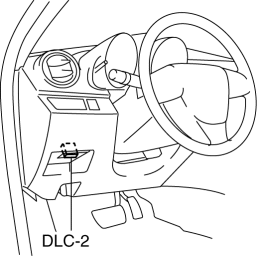
2. After the vehicle is identified, select the following items from the initialization screen of the IDS.
-
Select the “Module Programming”.
3. Then, select items from the screen menu in the following order.
-
Select “Programmable Module Installation”.
-
Select “EPS”.
4. Perform the configuration according to the directions on the screen.
5. Retrieve DTCs by the IDS, then verify that there is no DTC present.
-
If a DTC (s) is detected, perform the applicable DTC inspection..
 Electric Power Steering Oil Pump Component Removal/Installation
CAUTION:
Be careful not to drop the electric power steering oil pump component as
the internal parts of the EHPAS CM could be damaged. Replace the electric power
steering oil pump compon ...
 Electro Hydraulic Power Assist Steering (EHPAS) Control Module Inspection
Terminal Voltage Table (Reference)
Terminal
Signal name
Connected to
Measured item
Measured terminal (measured condition)
...
Other materials:
Manual Shift Mode
The manual shift mode gives you the feel
of driving a manual transaxle vehicle by
allowing you to operate the selector lever
manually. This allows you to control
engine rpm and torque to the drive wheels
much like a manual transaxle when more
control is desired.
To change to manual shift mo ...
Using the charging schedule function
The Subaru Solterra allows AC charging to be conveniently scheduled
in advance, enabling drivers to optimize charging times according to their daily
routine and energy cost preferences.
■ Calendar settings
The charging schedule of the Subaru Solterra operates based on the date and time
con ...
Starter Interlock Switch Inspection [Mzr 2.3 Disi Turbo]
CAUTION:
Do not reuse the starter interlock switch if it is removed from the vehicle
even once. Replace with a new starter interlock switch when installing.
1. Remove the battery cover..
2. Disconnect the negative battery cable..
3. Disconnect the starter interlock switch connec ...
